

Most UK small businesses waste £2,000 to £5,000 in the first year after buying the wrong VoIP phone system. The culprit isn’t usually the technology itself, it’s the checklist they never used before signing the contract.
Switching to voip phone systems for small business uk operations makes financial sense in 2026. Traditional phone lines are being phased out, and cloud-based communications offer flexibility that copper wires never could. But the market is crowded with providers making identical promises about “crystal-clear calls” and “seamless setup.” The difference between a system that transforms your business communications and one that becomes a daily frustration comes down to asking the right questions before you buy.
This guide cuts through the marketing noise to show you exactly what matters when evaluating VoIP for your UK small business. No fluff, no vendor bias, just the practical checks that separate reliable business phone systems from expensive mistakes.
Key Takeaways
- Internet quality determines call quality: Your existing broadband must meet minimum speed and latency requirements, or even premium VoIP will sound terrible
- Contract terms hide the real cost: Setup fees, per-user charges, support costs, and early termination penalties can double your expected spend
- UK-specific features matter: Geographic number availability, 999 emergency calling compliance, and local support hours affect daily operations
- Integration capabilities impact productivity: Your VoIP system should connect with existing CRM, email, and business tools without expensive custom development
- Scalability isn’t automatic: Some providers charge premium rates to add users or features, locking you into expensive upgrades
Why Your Internet Connection Matters More Than the VoIP Provider
The best VoIP provider in the world can’t fix a poor internet connection. Voice calls are real-time data streams that require consistent bandwidth and low latency, qualities that standard “up to 67Mbps” broadband packages don’t guarantee.
Minimum requirements for reliable VoIP:
- Download speed: 100 kbps per concurrent call (1 Mbps for 10 simultaneous calls)
- Upload speed: 100 kbps per concurrent call (often the bottleneck on asymmetric connections)
- Latency: Under 150ms for acceptable quality, under 70ms for excellent quality
- Jitter: Less than 30ms variation in packet arrival times
- Packet loss: Below 1% for business-grade calls
Most UK small businesses run VoIP over standard business broadband. That works fine for 3-5 concurrent calls, but quality degrades when multiple staff members are on calls while others stream video or download large files. The solution isn’t always upgrading to expensive leased lines, it’s understanding your actual usage patterns and implementing Quality of Service (QoS) settings on your router to prioritize voice traffic.
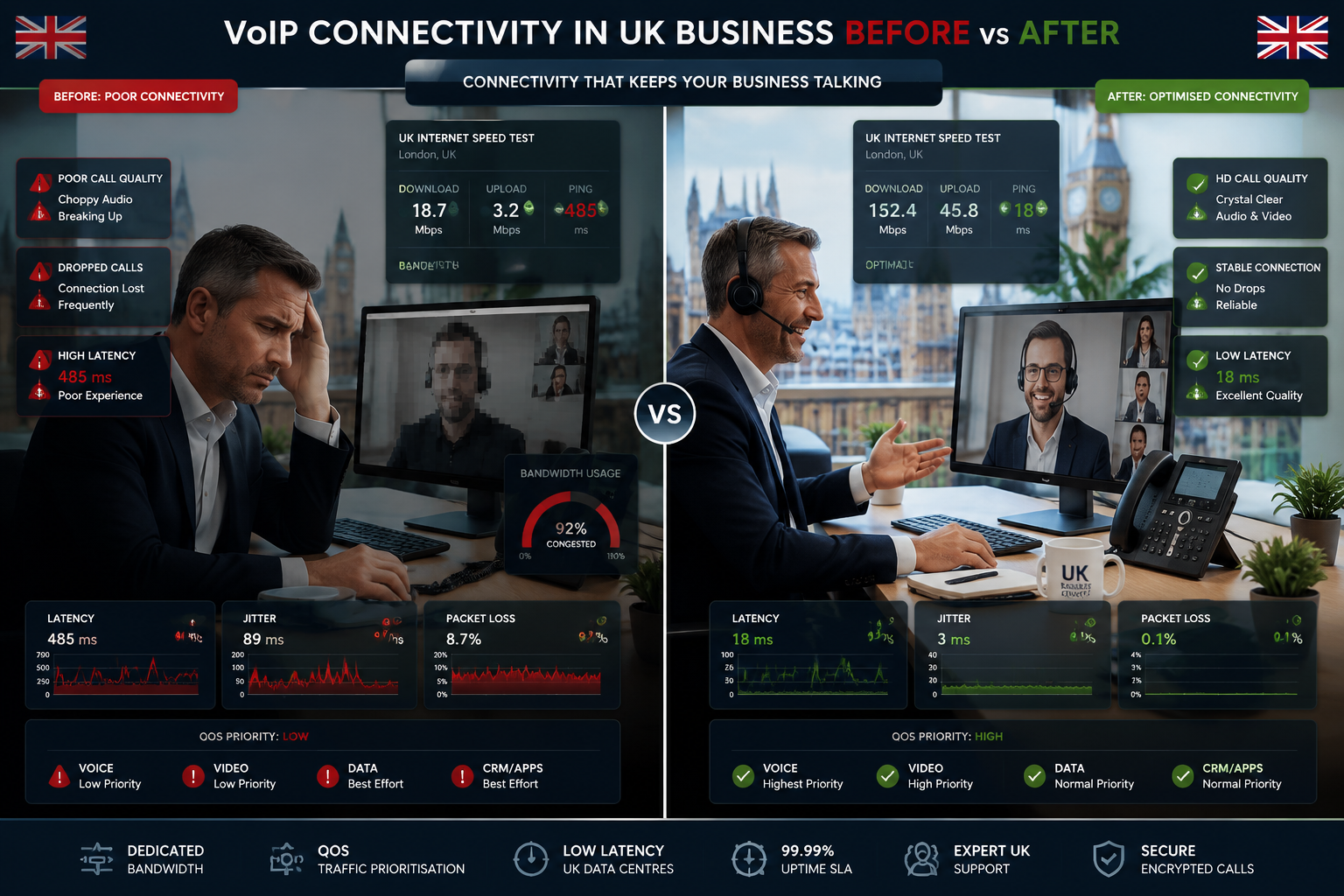
Test your connection before committing:
Run speed tests at different times of day, especially during peak business hours. Services like DSLReports.com provide VoIP-specific quality grades. If your jitter consistently exceeds 30ms or packet loss hits 2%, address your internet connection before shopping for VoIP providers. Some common VoIP phone system problems stem directly from network issues that no provider can solve.
Symmetric vs asymmetric connections:
Standard UK broadband offers asymmetric speeds (faster download than upload). VoIP uses both directions equally. A connection advertised as “67Mbps” might only provide 15-20Mbps upload, enough for 150-200 concurrent calls in theory, but real-world performance varies. Check your upload speed specifically, as this is where most small businesses hit bottlenecks.
For businesses with 10+ staff making frequent calls, consider dedicated internet access or SD-WAN solutions that guarantee bandwidth for voice traffic. The monthly cost difference (£50 to £150 more) is negligible compared to lost productivity from dropped calls and frustrated customers.
VoIP Phone Systems for Small Business UK: Contract Terms That Actually Matter
VoIP contracts look straightforward until you read the fine print. The advertised “£15 per user per month” rarely reflects what you’ll actually pay, and the terms that seem minor during the sales pitch become major headaches when you need to make changes.
Setup and onboarding costs:
Many providers charge one-time setup fees ranging from £0 to £500+. These cover number porting, system configuration, and initial training. Some providers waive setup fees but lock you into longer contracts. Calculate the total first-year cost including setup, not just the monthly rate.
Per-user pricing structures:
Most VoIP billing follows per-user-per-month models, but the definition of “user” varies. Some providers charge for every employee who might use the phone system, even if they rarely make calls. Others offer tiered pricing where basic users cost less than power users with advanced features. Understand exactly what’s included at each tier before committing.
Hidden costs to check:
- Phone hardware: Desk phones cost £80 to £300 each, or you can use softphones (apps) for free
- Premium numbers: Calling 0845, 0870, and international numbers often incurs per-minute charges on top of your monthly fee
- Support beyond basic: Some providers charge for phone support or limit free support to email-only
- Feature add-ons: Call recording, advanced analytics, and CRM integrations may cost extra
- Number porting fees: Moving your existing numbers to the new provider sometimes costs £5 to £15 per number
For a detailed breakdown of pricing structures, see our guide on VoIP billing models and watch for hidden costs that providers don’t advertise.
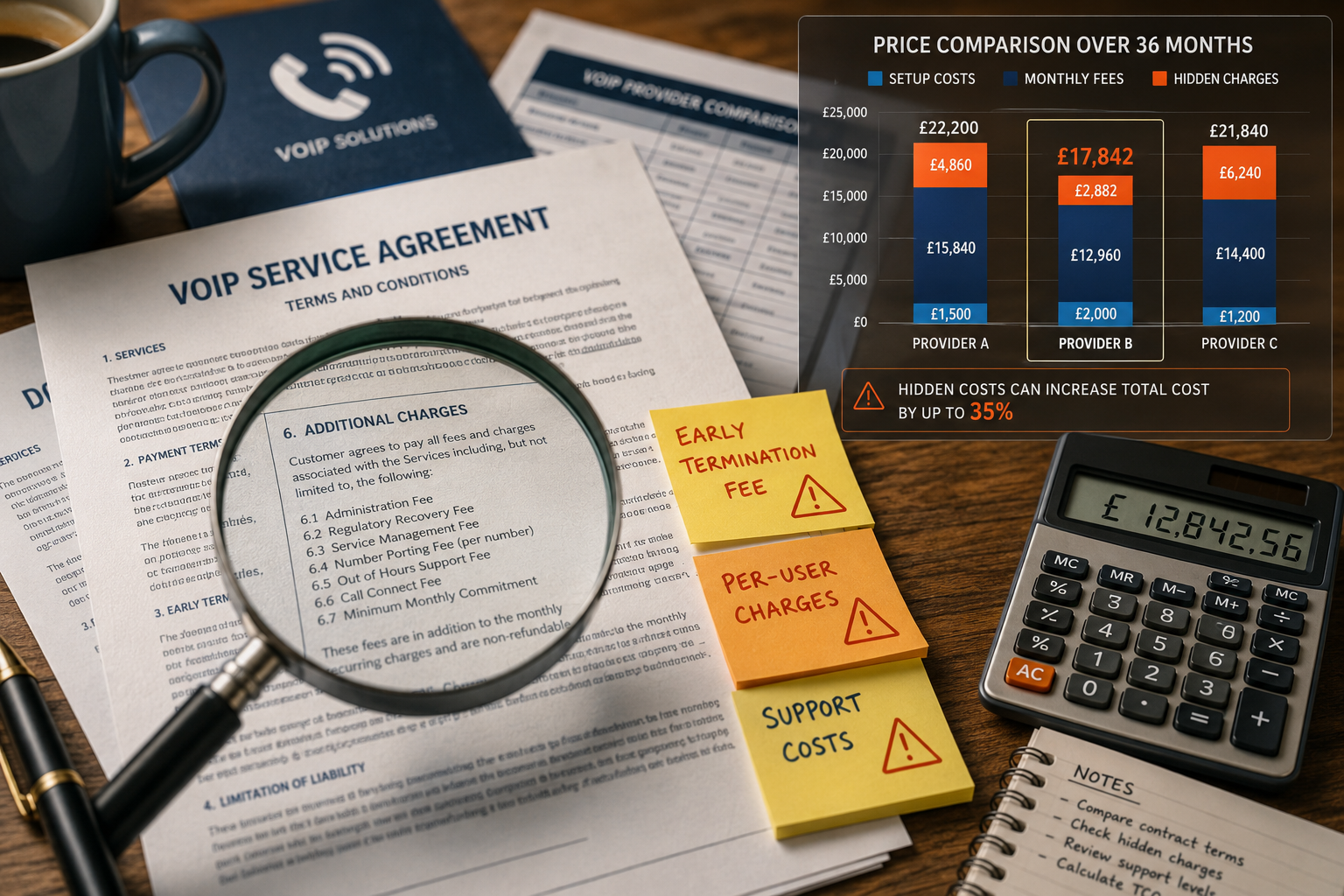
Contract length and exit terms:
UK VoIP contracts typically run 12, 24, or 36 months. Longer contracts often offer better monthly rates but limit your flexibility. The critical clause is the early termination fee, some providers charge the remaining contract value if you leave early, while others charge a flat penalty of 1-3 months’ fees.
What to negotiate:
- Trial period: Request 30 days to test the system with a money-back guarantee
- Scaling terms: Lock in pricing for adding users during your contract term
- Exit clauses: Negotiate reduced termination fees if service quality doesn’t meet SLA standards
- Price protection: Some contracts allow annual price increases tied to RPI, cap these at 3-5%
Before signing anything, review our VoIP contract red flags checklist to spot problematic terms that sales teams gloss over.
UK-Specific Features and Compliance Requirements
VoIP providers targeting the UK market should offer features that matter specifically for British businesses. Generic international providers often miss these details, creating compliance gaps and operational headaches.
Geographic and non-geographic numbers:
UK businesses typically want to maintain local presence with geographic numbers (020 for London, 0161 for Manchester, etc.). Check whether your provider offers the specific area codes you need and whether porting your existing numbers is included or costs extra. The porting process should complete within 10 working days under Ofcom regulations.
Non-geographic numbers (0800, 0333, 0345) are popular for customer service lines. Verify that your provider supports these and understand the cost structure, some charge premium rates for calls to these numbers.
Emergency services (999/112) compliance:
All UK VoIP providers must support emergency calling, but implementation varies. Traditional phone lines automatically transmit your location to emergency services. VoIP requires you to register your business address, and this location data doesn’t update automatically if you move or if staff work remotely.
Critical questions:
- Does the system support 999/112 calls from all devices (desk phones, softphones, mobile apps)?
- How do you update location data for remote workers?
- What happens to emergency calling if your internet connection fails?
Some providers offer mobile network failover for emergency calls, routing them through 4G/5G if broadband drops. This feature is worth prioritizing for businesses where reliable emergency access is critical.
GDPR and call recording:
If you record calls for training or compliance, your VoIP system must meet GDPR requirements. This means:
- Clear notification to callers that recording is happening
- Secure storage with access controls
- Defined retention periods and deletion processes
- Data subject access request (DSAR) capabilities
Most UK VoIP providers include GDPR-compliant call recording, but verify that storage is UK-based or EU-based rather than US-based, which creates additional compliance complexity.
Business hours and support location:
Check whether customer support operates during UK business hours with UK-based staff. Some international providers offer 24/7 support but route UK customers to overseas call centers where agents lack familiarity with UK-specific features and regulations.
Essential Features for Small Business VoIP Systems
Feature lists from VoIP providers read like phone book entries, hundreds of capabilities that sound impressive but may not matter for your business. Focus on the features that directly impact daily operations and customer experience.
Core features that every small business needs:
| Feature | Why It Matters | What to Check |
|---|---|---|
| Auto-attendant | Routes calls without a receptionist | Customizable menus, time-based routing, holiday schedules |
| Call forwarding | Ensures calls reach staff anywhere | Simultaneous ring, sequential forwarding, mobile app integration |
| Voicemail to email | Prevents missed messages | Transcription accuracy, delivery speed, attachment format |
| Call queuing | Manages high call volumes | Queue position announcements, estimated wait times, callback options |
| Presence indicators | Shows who’s available | Real-time status, integration with calendars, manual status control |
Advanced features worth considering:
- Call analytics: Detailed reporting on call volumes, wait times, missed calls, and agent performance helps identify bottlenecks
- CRM integration: Automatic call logging and screen pops with customer data save time and improve service quality
- Video conferencing: Built-in video eliminates the need for separate Zoom or Teams subscriptions
- Mobile apps: Full-featured apps let staff use business numbers from personal devices without sharing personal numbers
- Call recording: Essential for training, compliance, and dispute resolution in many industries
For businesses focused on sales, explore top VoIP phone features for sales teams to understand which capabilities drive revenue.
Features that sound good but rarely get used:
- Fax over IP: Most businesses have moved to digital document signing
- Music on hold customization: Standard hold music works fine; custom messages rarely justify the setup time
- Extensive IVR menus: Complex phone trees frustrate customers; keep it simple
Customization and flexibility:
The best VoIP systems let you adjust features without calling support. Check whether you can modify call routing, add users, change auto-attendant menus, and access analytics through a self-service portal. Systems that require provider intervention for basic changes slow down your operations. Learn more about customizing your business phone system to match your workflow.
Integration Capabilities and Business Tool Compatibility
Your phone system doesn’t exist in isolation. It should connect seamlessly with the other tools your business relies on, CRM platforms, help desk software, email, calendars, and productivity apps.
CRM integration benefits:
When your VoIP system integrates with your CRM (Salesforce, HubSpot, Zoho, Pipedrive), you get:
- Screen pops: Customer records appear automatically when calls come in
- Click-to-dial: Call customers directly from CRM records without typing numbers
- Automatic call logging: Every call is recorded in the customer timeline with duration, outcome, and recordings
- Activity tracking: Sales managers see call activity without manual reporting
These integrations save 5-10 minutes per call for sales and support teams. Over a month, that’s hours of recovered productivity per employee. For implementation details, see our guide on integrating your CRM with VoIP systems.
Other valuable integrations:
- Microsoft 365/Google Workspace: Calendar integration for presence status, contact syncing, and voicemail in email
- Slack/Teams: Click-to-call from chat apps, call notifications in channels, status synchronization
- Help desk software: Automatic ticket creation from calls, call data in support tickets
- Zapier/Make: Connect to hundreds of other apps through automation platforms
Integration implementation:
Some integrations are native (built directly into the VoIP platform), while others require third-party connectors or API development. Native integrations are always preferable, they’re more reliable, easier to set up, and don’t require ongoing maintenance.
Questions to ask providers:
- Which integrations are included in the base price vs. paid add-ons?
- Are integrations native or do they require middleware?
- How long does typical integration setup take?
- What happens to integrations when you update your CRM or other tools?
- Is API access available for custom integrations?
For businesses with unique workflows, API access is critical. Check whether the provider offers well-documented APIs and whether there are rate limits or additional costs for API usage. Explore more VoIP integrations for business productivity to understand the full ecosystem.
Scalability and Growth Considerations
Small businesses don’t stay small forever. Your VoIP system should grow with you without requiring a complete replacement or forcing you into expensive enterprise plans.
Adding users:
Check the pricing structure for adding users mid-contract. Some providers offer simple per-user pricing where adding someone costs the same as your existing users. Others have tiered pricing where your per-user cost increases once you cross certain thresholds (10 users, 25 users, 50 users).
Example pricing structures:
- Linear: £15 per user regardless of total users (best for predictable growth)
- Tiered: £15 per user for 1-10 users, £18 per user for 11-25 users (penalizes growth)
- Volume discount: £15 per user for 1-10 users, £12 per user for 11-25 users (rewards growth)
Adding locations:
If you plan to open additional offices or support remote workers, verify that your VoIP system handles multiple locations without separate contracts or complex networking. Cloud-based VoIP systems excel here, new locations just need internet access and devices.
Feature upgrades:
Understand how feature upgrades work. Can you add call recording for specific users without upgrading everyone? Can you add video conferencing later if you don’t need it initially? Flexible systems let you pay for what you use and add capabilities as needs evolve.
International expansion:
If international growth is on your roadmap, check whether your provider offers local numbers in target countries and what international calling rates look like. Some UK-focused providers have limited international capabilities, while others offer global coverage with competitive rates.
System limits:
Every VoIP platform has technical limits, maximum concurrent calls, maximum users, storage limits for recordings and voicemails. These limits rarely matter for small businesses initially but can become constraints as you grow. Ask about these limits and what happens when you approach them.
Reliability, Uptime, and Disaster Recovery
Phone systems are mission-critical infrastructure. When your phones go down, your business stops taking orders, supporting customers, and generating revenue. Reliability isn’t negotiable.
Service Level Agreements (SLAs):
Reputable VoIP providers offer SLAs guaranteeing uptime percentages, typically 99.9% or 99.99%. These numbers sound similar but represent very different amounts of downtime:
- 99.9% uptime: 8.76 hours of downtime per year (43.8 minutes per month)
- 99.99% uptime: 52.6 minutes of downtime per year (4.38 minutes per month)
What SLAs actually cover:
Read the SLA carefully. Many only cover the provider’s core infrastructure, not issues with your internet connection, power outages, or device failures. Some exclude scheduled maintenance windows from uptime calculations. The compensation for SLA breaches is typically service credits (a percentage off your next bill) rather than cash refunds, and you usually need to request these credits manually.
Redundancy and failover:
Ask how the provider handles failures:
- Geographic redundancy: Are voice servers distributed across multiple UK data centers?
- Internet failover: Can calls automatically route through 4G/5G if broadband fails?
- Device failover: Can desk phones fail over to mobile apps or vice versa?
- Power backup: Do desk phones work during power outages (most VoIP phones require power, unlike traditional lines)?
For comprehensive planning, review our VoIP disaster recovery guide.
Call quality monitoring:
Providers should proactively monitor call quality and alert you to issues before they impact customers. Look for systems that track:
- Mean Opinion Score (MOS): Industry-standard call quality metric (4.0+ is good)
- Jitter and latency trends: Early warning signs of network problems
- Packet loss patterns: Indicates connection issues or bandwidth constraints
Your responsibility:
Reliability isn’t solely the provider’s job. You need:
- Reliable internet: Consider backup internet connections for critical operations
- Power backup: UPS systems for phones and network equipment
- Device maintenance: Keep firmware updated and replace aging hardware
- Staff training: Ensure team members know how to use mobile apps and failover options
Security and Fraud Prevention
VoIP systems are internet-connected, which makes them targets for fraud, eavesdropping, and denial-of-service attacks. UK small businesses lose thousands of pounds annually to VoIP fraud, often without realizing it until the bill arrives.
Common VoIP security threats:
- Toll fraud: Attackers gain access to your system and make expensive international calls charged to your account
- Eavesdropping: Unencrypted calls can be intercepted and recorded
- Denial of service: Attackers flood your system with traffic, making it unusable
- Number spoofing: Scammers impersonate your business number for fraud (learn more about VoIP number spoofing)
Security features to require:
- Encryption: All calls should use TLS (signaling) and SRTP (media) encryption
- Strong authentication: Multi-factor authentication for admin access, complex password requirements
- IP whitelisting: Restrict admin access to specific IP addresses
- Call limits: Set maximum international calling limits and geographic restrictions
- Fraud detection: Real-time monitoring for unusual calling patterns with automatic blocking
Best practices for your business:
- Change default passwords immediately on all devices
- Restrict international calling to only users who need it
- Review call logs monthly for suspicious activity
- Keep all devices and software updated with security patches
- Train staff to recognize phishing attempts targeting VoIP credentials
For detailed security guidance, see our articles on securing your VoIP system against cyber attacks and reducing business phone fraud.
Compliance and data protection:
Beyond security, ensure your provider complies with UK data protection regulations. Ask where call recordings and voicemails are stored (UK/EU data centers preferred), how long data is retained, and what happens to your data if you leave the provider.
Hardware vs. Softphone: What Your Team Actually Needs
One of VoIP’s advantages is flexibility in how staff access the phone system. You’re not limited to desk phones, softphones (software applications) and mobile apps provide full functionality without physical hardware.
Desk phones:
Traditional desk phones provide the familiar experience and work well for:
- Reception desks and high-volume call roles
- Shared workspaces where multiple staff use the same phone
- Environments where computer access is limited
- Staff who prefer physical buttons and handsets
Quality VoIP desk phones cost £80 to £300 depending on features (screen size, programmable buttons, built-in Bluetooth). Budget models work fine for basic calling, while executive models offer color touchscreens and premium audio.
Softphones:
Software applications that turn computers into phones offer:
- Zero hardware cost (uses existing computers and headsets)
- Easy remote work support
- Screen integration for click-to-dial and contact management
- Simplified deployment (just install software)
Softphones work best for staff who spend most of their day at computers and are comfortable with headsets. Call quality depends on computer audio hardware, invest in decent USB headsets (£30 to £80) for professional sound quality.
Mobile apps:
Full-featured mobile apps let staff use business phone numbers from smartphones. This is ideal for:
- Remote workers and field staff
- After-hours on-call coverage
- Business continuity (calls reach staff anywhere)
- Separating business and personal calls without carrying two phones
Hybrid approach:
Most small businesses use a mix: desk phones for reception and high-volume roles, softphones for office staff, and mobile apps for everyone as a backup and for remote work. This flexibility is one of VoIP’s key advantages over traditional phone systems.
What to check with providers:
- Are softphones and mobile apps included or extra cost?
- How many simultaneous devices can each user have?
- Do all features work across all device types?
- What operating systems are supported (Windows, Mac, iOS, Android)?
Support Quality and Onboarding Process
The best VoIP system is useless if you can’t get help when something goes wrong. Support quality varies dramatically between providers, and you won’t know how good it is until you need it.
Support channels:
- Phone support: Essential for urgent issues; check hours of operation and whether it’s UK-based
- Email/ticket support: Fine for non-urgent questions; check typical response times
- Live chat: Convenient for quick questions during setup
- Knowledge base: Self-service documentation for common tasks
- Community forums: Useful for advanced users but shouldn’t be the primary support method
Support costs:
Some providers include comprehensive support in base pricing, while others charge for phone support or limit free support to email-only. Premium support plans (£50 to £200+ per month) typically offer faster response times, dedicated account managers, and proactive monitoring.
Onboarding and training:
The transition to VoIP requires setup and training. Good providers offer:
- Dedicated onboarding specialist: Guides you through setup and configuration
- Number porting assistance: Handles the technical process of moving existing numbers
- Staff training sessions: Live or recorded training on using the system
- Documentation: User guides, quick-start cards, video tutorials
Questions to ask during sales:
- What’s included in onboarding vs. what costs extra?
- How long does typical onboarding take?
- What training is provided for staff?
- What’s the average response time for support tickets?
- Can you speak with current customers about their support experience?
Testing support before buying:
During your evaluation, contact support with pre-sales questions. This gives you a preview of response times, knowledge level, and communication quality. If pre-sales support is slow or unhelpful, post-sales support will likely be worse.
Comparing VoIP Providers: A Practical Framework
With dozens of VoIP providers targeting UK small businesses, comparison can be overwhelming. Use this framework to evaluate options systematically.
Create a comparison spreadsheet with these columns:
- Provider name
- Monthly cost per user (including all required features)
- Setup/onboarding costs
- Contract length and exit terms
- Key features included (vs. add-ons)
- Integration capabilities (native vs. third-party)
- SLA uptime guarantee
- Support channels and hours
- UK-specific features (geographic numbers, 999 support)
- Scalability (cost to add users, locations)
Scoring system:
Rate each provider on a 1-5 scale for:
- Value (cost vs. features)
- Reliability (SLA, redundancy, track record)
- Ease of use (interface, mobile apps, setup)
- Support quality (responsiveness, knowledge, availability)
- Growth fit (scalability, flexibility, feature roadmap)
This structured approach prevents decision-making based solely on price or a single impressive feature. For a detailed comparison of top options, see our best UK VoIP provider for small business guide.
Trial periods:
Always test before committing. Most providers offer 14-30 day trials or money-back guarantees. During the trial:
- Test call quality from your actual office location
- Have multiple staff members use the system daily
- Try all features you plan to use regularly
- Test mobile apps and remote access
- Contact support with questions to evaluate responsiveness
- Make test calls to customers (with their knowledge) to verify external call quality
Reference checks:
Ask providers for references from similar-sized UK businesses in your industry. Speak with these references about:
- Actual uptime vs. promised SLA
- Support responsiveness and quality
- Hidden costs or surprises after signing
- Ease of adding users or features
- Any regrets or things they’d do differently
Making the Final Decision
You’ve done the research, compared providers, and tested systems. Now it’s time to decide and implement.
Final checklist before signing:
✅ Internet connection tested and meets requirements
✅ Total first-year cost calculated (setup + monthly + hardware + extras)
✅ Contract terms reviewed (length, exit clauses, price increases)
✅ UK-specific features confirmed (geographic numbers, 999 support)
✅ Integration with existing tools verified
✅ Scalability costs understood (adding users, locations, features)
✅ SLA and reliability guarantees documented
✅ Security features confirmed (encryption, fraud protection)
✅ Support quality tested (response times, knowledge level)
✅ Trial completed successfully (call quality, features, usability)
Implementation timeline:
Typical VoIP implementation for a small business takes 2-4 weeks:
- Week 1: Contract signing, account setup, number porting initiated
- Week 2: System configuration, device delivery/setup, integration configuration
- Week 3: Staff training, testing, parallel running with old system
- Week 4: Full cutover, old system decommissioned
Plan the cutover for a low-volume period (not Monday morning or peak season). Keep your old system active for a few days during parallel running to ensure everything works before fully committing.
Post-implementation:
- Schedule a 30-day review with your provider to address any issues
- Collect feedback from staff on usability and problems
- Review first month’s call analytics to optimize routing and staffing
- Document your configuration and processes for future reference
- Set calendar reminders to review your contract 3-6 months before renewal
For additional guidance on the transition process, see our article on switching to VoIP and what to expect.
Frequently Asked Questions
How much should a small business expect to pay for VoIP in the UK?
Expect £10 to £25 per user per month for quality business VoIP service, plus £100 to £500 in setup costs and £80 to £300 per desk phone if you choose hardware over softphones. Total first-year cost for a 5-person business typically runs £1,200 to £2,500. Cheaper options exist but often lack essential features or reliable support.
Can I keep my existing phone numbers when switching to VoIP?
Yes, number porting is standard for UK VoIP providers. The process takes 10-15 working days and should be included in your setup (some providers charge £5 to £15 per number). You’ll need to provide a Letter of Authority and recent bill from your current provider. During porting, your old service continues until the switch completes.
What internet speed do I need for VoIP?
Minimum 100 kbps upload and download per concurrent call, but that’s cutting it close. For reliable quality, plan for 1 Mbps per concurrent call plus overhead for other internet usage. A 5-person office with 3 concurrent calls needs at least 5-10 Mbps upload speed. Test your actual upload speed, as this is often the bottleneck on standard broadband.
Do VoIP phones work during power cuts?
Most VoIP desk phones require power, unlike traditional landlines. During power outages, calls can automatically forward to mobile phones if configured in advance. For critical operations, use UPS (uninterruptible power supply) units to keep phones and network equipment running during brief outages, and ensure mobile apps are set up as backup.
Is VoIP secure for confidential business calls?
Yes, when properly configured. Look for providers offering TLS and SRTP encryption, which protects calls from eavesdropping. Enable strong authentication, restrict international calling, and monitor for unusual activity. VoIP can be more secure than traditional phone lines, which are easier to physically tap. Review our VoIP security guide for detailed protection measures.
Can remote workers use the business VoIP system?
Absolutely, this is one of VoIP’s major advantages. Remote workers install the mobile app or softphone and use the business phone system from anywhere with internet access. Calls appear to come from business numbers, and all features (voicemail, call forwarding, conferencing) work identically to office-based staff. Just ensure remote workers have reliable home internet.
Conclusion
Choosing the right VoIP phone system for your UK small business isn’t about finding the cheapest option or the one with the longest feature list. It’s about matching capabilities to your actual needs, ensuring your internet infrastructure can support quality calls, and selecting a provider who’ll support you reliably as your business grows.
The checklist is straightforward: test your internet connection, calculate total costs including hidden fees, verify UK-specific features like geographic numbers and 999 support, confirm integration with your existing business tools, understand scalability costs, review security measures, and actually trial the system before committing.
Most importantly, read the contract carefully. The terms around pricing changes, early termination, and support levels matter more than the sales pitch. Take time to compare multiple providers using a structured framework, speak with current customers, and don’t let sales pressure rush you into a decision.
The UK small business VoIP market is competitive in 2026, which works in your favor. Providers are offering better features, more flexible contracts, and competitive pricing to win your business. Use that competition to negotiate terms that protect your interests and support your growth.
Next steps:
- Test your internet connection using VoIP-specific quality tools
- List your must-have features and nice-to-have features
- Request quotes from 3-5 providers using your specific requirements
- Trial your top 2-3 choices for at least two weeks
- Review contracts with the checklist from this guide
- Negotiate terms before signing
- Plan your implementation timeline with staff input
The right VoIP system transforms business communications from a cost center into a competitive advantage. Take the time to choose wisely, and you’ll have a scalable, reliable phone system that supports your business for years to come.
For ongoing guidance, explore our complete library of VoIP resources covering everything from setup guides to advanced customization.