
By January 2027, every traditional phone line in the UK will stop working. That’s not a prediction, it’s a confirmed deadline from Openreach and other network operators. The PSTN (Public Switched Telephone Network) switch-off 2027 business impact will affect roughly 1.6 million UK businesses still relying on copper-based phone lines, alarm systems, payment terminals, and legacy infrastructure.
If your business still uses a traditional landline, you’re running out of time to prepare. The pstn switch off 2027 business transition isn’t optional, and waiting until the last minute will cost you more in rushed decisions, limited provider availability, and potential service disruptions.
This guide cuts through the confusion. You’ll learn exactly what’s happening, why it matters to your business, and the specific steps to migrate without disrupting operations or overpaying for your replacement system.
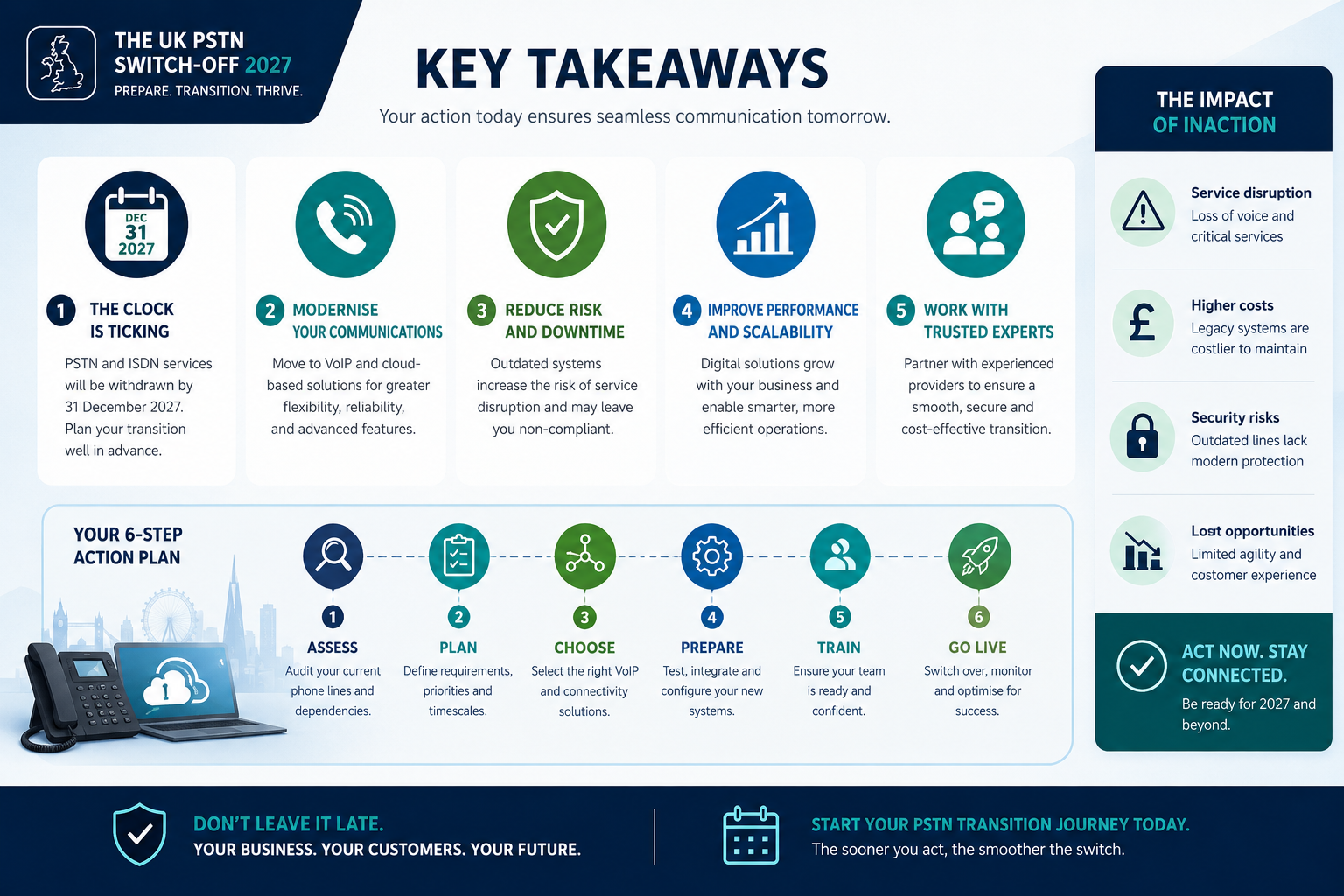
Key Takeaways
- The PSTN network shuts down completely in January 2027,all copper-based phone lines will cease functioning, affecting landlines, fax machines, alarm systems, and payment terminals.
- Businesses must migrate to IP-based solutions like VoIP or cloud phone systems before the deadline to maintain communications.
- Early migration saves money and stress,waiting until 2027 means limited provider choice, rushed implementation, and higher costs.
- Your action plan should start now: audit current systems, evaluate VoIP providers, test internet capacity, train staff, and complete migration by Q3 2026.
- Beyond phones, check all connected devices,alarm systems, door entry systems, lift lines, and payment terminals may need upgrades or replacements.
What Is the PSTN Switch-Off and Why Is It Happening?
The PSTN (Public Switched Telephone Network) is the traditional copper wire telephone infrastructure that’s been connecting UK businesses and homes since the Victorian era. It’s the same technology that powered rotary phones, fax machines, and the dial-up internet of the 1990s.
Openreach, BT, Virgin Media, and other UK network operators are shutting down this aging infrastructure permanently. The official deadline: January 2027.
Why the Switch-Off Is Inevitable
The copper network is expensive to maintain, increasingly unreliable, and incompatible with modern digital services. Network operators are replacing it with IP (Internet Protocol) networks, the same technology that powers the internet, email, and modern cloud services.
The business case is straightforward:
- Maintenance costs: Copper infrastructure requires constant repairs and specialized engineers
- Capacity limits: PSTN can’t support modern bandwidth demands
- Technology obsolescence: Manufacturers have stopped producing PSTN equipment
- Efficiency gains: IP networks deliver voice, data, and video over a single connection
This isn’t unique to the UK. Similar transitions have already happened in Germany, Sweden, and parts of the United States. The UK timeline is simply more aggressive and comprehensive.
What Actually Stops Working in 2027
When the switch-off happens, these systems will immediately stop functioning:
- Traditional landline phones
- Fax machines connected via phone lines
- Analog alarm systems (burglar alarms, fire alarms)
- Payment card terminals using phone line connections
- Door entry systems
- Lift emergency phones
- Telecare and health monitoring devices
- Any equipment using dial-up or analog connections
Critical point: Your phone number doesn’t disappear. You can port existing numbers to new VoIP systems. But the physical copper line connection will be permanently disconnected.
How the PSTN Switch-Off 2027 Business Impact Affects Different Industries
The pstn switch off 2027 business consequences vary dramatically by sector. Some industries face minor inconveniences; others risk serious operational disruptions.
Retail and Hospitality
Primary concerns: Payment terminals, door entry systems, alarm systems
Most modern card terminals already use internet connections, but older models still rely on phone lines. If your payment terminal makes that distinctive dial-up sound when processing transactions, it needs replacing.
Door entry systems in hotels, restaurants, and retail premises often use analog phone connections. These require either full replacement or adapter hardware to work with IP networks.
Healthcare and Care Facilities
Primary concerns: Telecare devices, emergency call systems, patient monitoring
This sector faces the most serious risks. Many telecare devices (personal alarms, fall detectors, health monitors) were designed for analog phone lines and won’t work on digital networks without specific adapters or replacements.
The Telecare Services Association estimates that over 1.7 million people in the UK use telecare devices. Healthcare providers must verify every device’s compatibility well before the deadline.
Property Management and Facilities
Primary concerns: Lift emergency phones, building management systems, security
UK law requires working emergency phones in lifts. These traditionally used dedicated phone lines. Property managers must upgrade to IP-compatible systems and ensure backup power supplies work correctly.
Building management systems, HVAC controls, and security systems often include phone-line reporting features that will stop working after the switch-off.
Professional Services and Offices
Primary concerns: Phone systems, fax machines, conference lines
This is the simplest migration scenario. Most modern offices can transition to business VoIP providers with minimal disruption. The main challenge is coordinating the switch to avoid downtime during business hours.
Fax users have two options: switch to internet fax services or use VoIP systems with fax-over-IP capabilities (though reliability varies).
Your PSTN Switch-Off 2027 Business Action Plan: 5 Essential Steps
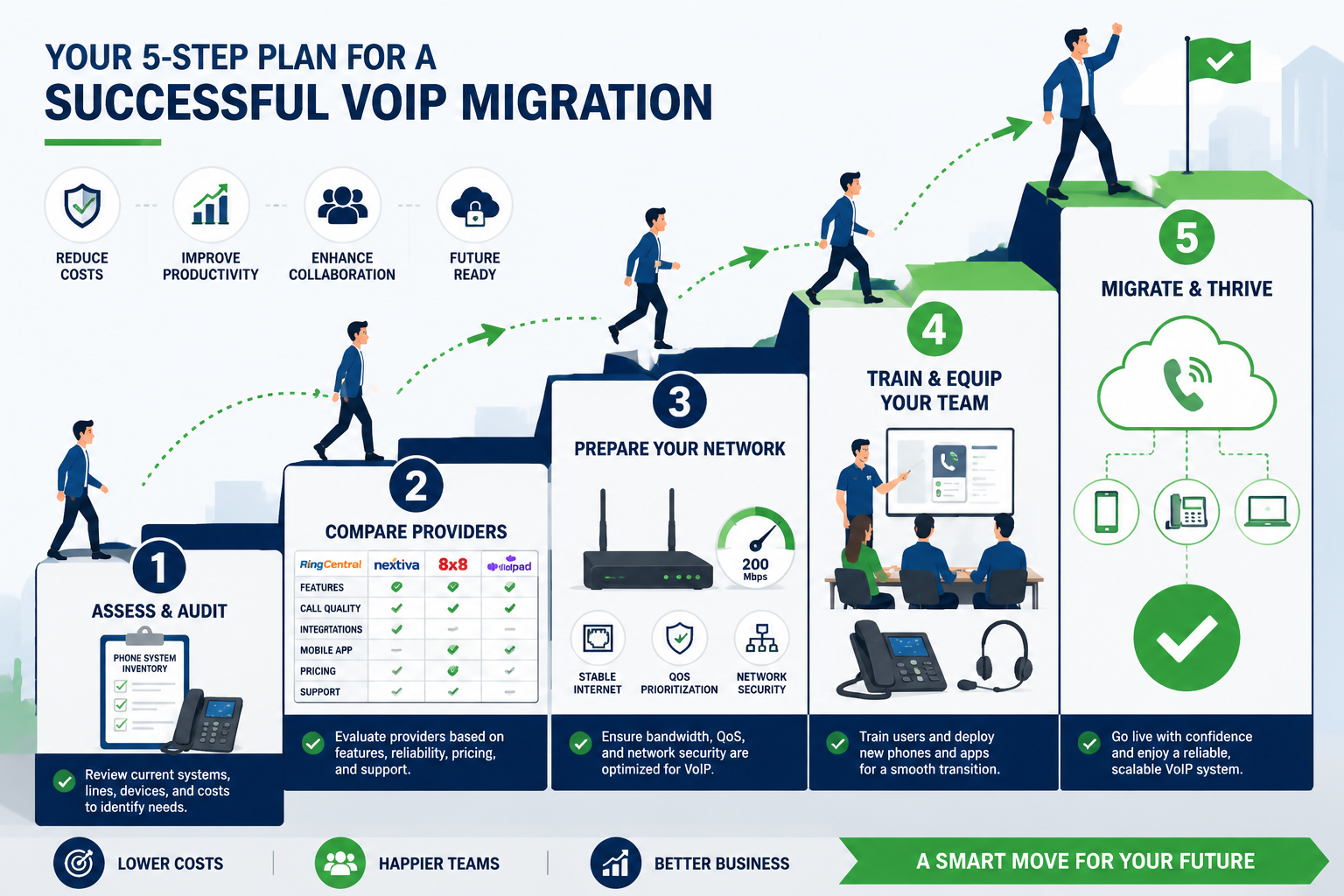
Successful migration requires planning, not panic. Follow this timeline to complete your transition smoothly and cost-effectively.
Step 1: Audit Your Current Systems (Start Now)
Create a complete inventory of everything connected to phone lines:
Communications equipment:
- Desk phones and handsets
- Fax machines
- Conference phones
- Voicemail systems
Connected devices:
- Alarm systems (burglar, fire, panic)
- Payment terminals
- Door entry systems
- Lift emergency phones
- CCTV systems with phone-line reporting
- Building management systems
Critical questions to answer:
- Which phone numbers do you currently use?
- How many simultaneous calls does your business typically handle?
- Do you have any toll-free or premium-rate numbers?
- What’s your average monthly phone bill?
Document everything. This inventory determines your replacement system requirements and helps you avoid nasty surprises during migration.
Step 2: Evaluate VoIP and Cloud Phone System Options (Q1-Q2 2026)
The pstn switch off 2027 business transition forces a choice between several replacement technologies. For most businesses, VoIP (Voice over Internet Protocol) offers the best combination of features, reliability, and cost.
Key decision factors:
Hosted vs. On-Premise:
- Hosted/Cloud VoIP: Provider manages equipment and maintenance; you pay monthly per user (typically £10 to £25 per user)
- On-Premise: You own the hardware; higher upfront cost but lower long-term expense for larger teams
Essential features to compare:
- Call forwarding and routing
- Voicemail-to-email
- Auto-attendant and call queues
- Mobile apps for remote work
- CRM integrations
- Call recording and analytics
- Number porting support
Reliability requirements:
- Uptime guarantees (look for 99.9% or better)
- Redundancy and failover options
- UK-based support availability
- Emergency backup procedures
Our complete guide to UK VoIP providers compares the leading options for small and medium businesses. Pay particular attention to providers with proven experience in PSTN migration projects.
For businesses new to VoIP technology, start with our beginner’s guide to VoIP for businesses to understand the fundamentals before evaluating specific providers.
Step 3: Assess and Upgrade Your Internet Connection (Q2 2026)
VoIP quality depends entirely on your internet connection. A phone system that worked perfectly on copper lines will fail miserably on inadequate broadband.
Minimum requirements:
- Bandwidth: 100 kbps per simultaneous call (upload and download)
- Latency: Under 150ms for acceptable quality
- Jitter: Under 30ms
- Packet loss: Under 1%
Practical calculation: A business with 10 employees making 5 simultaneous calls needs at least 1 Mbps dedicated to voice traffic, plus bandwidth for normal internet use.
Connection type recommendations:
| Connection Type | Suitability | Notes |
|---|---|---|
| Fiber (FTTP) | Excellent | Best option; symmetrical speeds, low latency |
| Fiber to Cabinet (FTTC) | Good | Adequate for most small businesses |
| ADSL | Poor | Insufficient upload speeds for multiple calls |
| 4G/5G Backup | Essential | Provides redundancy if primary connection fails |
Critical upgrade: If you’re still on ADSL or basic broadband, upgrade to fiber before migrating your phone system. The cost difference is minimal compared to the business impact of dropped calls and poor quality.
Consider implementing Quality of Service (QoS) settings on your router to prioritize voice traffic. Our guide on optimizing your network for VoIP performance provides detailed configuration instructions.
Step 4: Plan Your Migration and Train Your Team (Q3 2026)
Migration timeline:
8-12 weeks before go-live:
- Select provider and sign contract
- Order internet upgrades if needed
- Submit number porting requests (can take 10-30 days)
- Order phones and equipment
4-6 weeks before go-live:
- Configure system settings
- Set up call routing and auto-attendants
- Test system with small user group
- Create user documentation
2 weeks before go-live:
- Train all staff on new system
- Configure mobile apps
- Test emergency procedures
- Prepare backup communication plan
Go-live week:
- Switch over during low-traffic period
- Monitor system closely
- Provide immediate support for issues
- Keep old system available as backup for 1-2 weeks
Training essentials: Staff need to know how to make and receive calls, transfer calls, access voicemail, use mobile apps, and report problems. Don’t assume it’s intuitive, even simple systems require proper training.
For detailed guidance on the transition process, see our article on switching to VoIP: what to expect during transition.
Step 5: Address Connected Devices and Legacy Systems (Q3-Q4 2026)
This is where businesses often encounter unexpected costs and complications.
Alarm systems: Contact your alarm monitoring company immediately. They’ll advise whether your system needs:
- A simple adapter (£50 to £200)
- Firmware updates (often free)
- Complete replacement (£500 to £2,000+)
Payment terminals: Contact your payment processor. Most will provide updated terminals at no cost or minimal charge. Don’t wait, terminal shortages are likely as the deadline approaches.
Lift emergency phones: This requires a specialist engineer. Budget £300 to £800 per lift for compliant IP-based emergency phones with battery backup.
Door entry systems: Older systems may need complete replacement (£500 to £2,000). Newer systems might work with analog telephone adapters (ATAs), though this isn’t always reliable.
Fax machines: Consider whether you actually need fax capability. If yes, options include:
- Internet fax services (£5 to £20 monthly)
- VoIP systems with fax support (reliability varies)
- Dedicated fax-over-IP adapters (£100 to £300)
Common PSTN Switch-Off Migration Mistakes to Avoid
Waiting Until Late 2026 or Early 2027
The problem: Provider capacity is finite. As the deadline approaches, VoIP providers will face overwhelming demand. Expect:
- Limited appointment availability
- Longer installation times
- Reduced negotiating power on pricing
- Rushed implementations with inadequate testing
The solution: Complete your migration by September 2026. This gives you buffer time for unexpected issues and avoids the last-minute rush.
Underestimating Internet Requirements
The problem: Businesses often assume their current broadband is adequate without testing. Poor call quality, dropped calls, and one-way audio are common symptoms of insufficient bandwidth or network issues.
The solution: Run proper network assessments before committing to a VoIP system. Many providers offer free network testing tools. If your connection is marginal, upgrade first.
Understanding VoIP QoS (Quality of Service) is essential for maintaining call quality after migration.
Ignoring Mobile and Remote Workers
The problem: Traditional phone systems tied employees to desk phones. Modern systems need to support mobile workers, home offices, and flexible working arrangements.
The solution: Choose a system with robust mobile apps and softphone capabilities. Test these features thoroughly before go-live. Remote workers should have the same functionality as office-based staff.
Forgetting About Emergency Calling
The problem: VoIP systems handle emergency calls (999/112) differently than traditional lines. Location information isn’t automatically transmitted, which can delay emergency response.
The solution: Configure emergency calling properly:
- Register physical addresses for all locations
- Update addresses when employees work remotely
- Test emergency calling procedures
- Ensure staff know how to provide location information
Choosing Based Solely on Price
The problem: The cheapest VoIP provider often delivers the worst experience. Poor call quality, unreliable service, and inadequate support cost far more than the monthly savings.
The solution: Evaluate providers on:
- Reliability: Uptime guarantees and redundancy
- Support quality: UK-based support, response times
- Feature set: Does it meet your actual needs?
- Scalability: Can it grow with your business?
- Contract terms: Avoid long lock-ins initially
Price matters, but it shouldn’t be the only factor. A system that costs £5 more per user but delivers better reliability and support is worth the investment.
Cost Considerations: What to Budget for PSTN Migration
Typical Migration Costs for Small Businesses (5-20 Employees)
One-time costs:
- VoIP phones: £50 to £200 per handset (or use softphones on existing computers)
- Installation and setup: £200 to £800
- Number porting fees: £0 to £50 per number
- Network upgrades: £0 to £500 (if router upgrade needed)
- Connected device updates: £200 to £2,000 (varies significantly)
Ongoing monthly costs:
- Hosted VoIP service: £10 to £25 per user
- Internet connection: £30 to £100 (may be existing cost)
- Support and maintenance: Often included in hosted plans
Total first-year cost estimate: £2,000 to £6,000 for a 10-person business, including equipment and 12 months of service.
Typical Migration Costs for Medium Businesses (20-100 Employees)
One-time costs:
- VoIP phones: £50 to £200 per handset
- Installation and configuration: £1,000 to £5,000
- Number porting: £0 to £50 per number
- Network infrastructure upgrades: £500 to £3,000
- Connected device updates: £1,000 to £10,000+
Ongoing monthly costs:
- Hosted VoIP service: £8 to £20 per user (volume discounts apply)
- Dedicated internet connection: £100 to £500
- Support and maintenance: Included or £50 to £200 monthly
Total first-year cost estimate: £15,000 to £40,000 for a 50-person business.
Hidden Costs to Watch For
- Training time: Staff productivity dips during transition
- Dual-running period: Maintaining old and new systems simultaneously
- Emergency device replacements: Alarm systems, payment terminals discovered at the last minute
- Contract exit fees: Early termination charges from current provider
- Unexpected compatibility issues: Legacy equipment that requires expensive adapters or replacement
For detailed cost breakdowns, see our guide on how much VoIP costs for a business.
Beyond Compliance: Business Benefits of Early VoIP Migration
While the pstn switch off 2027 business deadline forces migration, early adopters gain significant competitive advantages.
Enhanced Flexibility and Remote Work Support
Modern cloud phone systems support distributed teams seamlessly. Employees can take and make calls from anywhere using mobile apps, maintaining professional presence regardless of location.
Features like hot-desking, call forwarding to mobile, and unified communications make flexible working arrangements practical and professional.
Advanced Features That Improve Customer Experience
VoIP systems include capabilities impossible with traditional phone lines:
- Intelligent call routing: Direct customers to the right department or person automatically
- Call queuing with position announcements: Reduce perceived wait times
- Voicemail-to-email transcription: Never miss important messages
- CRM integration: Display customer information automatically when they call
- Call recording: Train staff and resolve disputes
- Real-time analytics: Monitor call volumes, wait times, and service levels
These features directly impact customer satisfaction and operational efficiency. Learn more about how VoIP can improve your business’s customer experience.
Significant Cost Savings
Despite migration costs, most businesses save money within 12-18 months:
- Lower per-minute costs: Especially for international calls
- Reduced line rental: One internet connection replaces multiple phone lines
- Eliminated hardware maintenance: Provider handles system updates and repairs
- Reduced office space requirements: Softphones eliminate desk phone needs
Our analysis shows businesses typically reduce phone costs by 30% to 60% after migrating to VoIP. See how VoIP can cut business phone bills in half for detailed examples.
Better Business Continuity and Disaster Recovery
Traditional phone systems fail when your office is inaccessible. VoIP systems continue working because they’re not tied to physical location.
During emergencies, calls automatically forward to mobile phones or home offices. Your business remains reachable even if your premises are closed.
Proper VoIP disaster recovery planning ensures communications continuity regardless of circumstances.
Scalability Without Infrastructure Investment
Adding new users to traditional phone systems required physical installation and equipment. VoIP systems scale instantly, new users simply log in.
This makes seasonal staffing, rapid growth, and temporary workers far easier to accommodate. You pay only for active users, adjusting capacity as needed.
Security and Reliability Concerns: What You Need to Know
Is VoIP as Reliable as Traditional Phone Lines?
Short answer: Yes, when implemented properly with adequate internet connectivity and backup systems.
Longer answer: Traditional phone lines had one major advantage, they worked during power outages because the phone line itself carried power. VoIP systems require both internet connectivity and electrical power.
Reliability strategies:
✅ Redundant internet connections: Primary fiber connection plus 4G/5G backup ✅ Uninterruptible Power Supply (UPS): Keeps phones and network equipment running during brief outages ✅ Mobile app failover: Automatically forward calls to mobile phones if office connection fails ✅ Geographic redundancy: Hosted systems operate from multiple data centers
Quality providers deliver 99.9%+ uptime, equivalent to or better than traditional phone lines. The key is choosing a reputable provider and implementing proper backup systems.
VoIP Security Risks and Protections
VoIP systems face different security threats than traditional phone lines:
Common threats:
- Toll fraud: Hackers make expensive international calls through your system
- Eavesdropping: Unencrypted calls can be intercepted
- Denial of service: Attacks that overwhelm your system
- Number spoofing: Criminals impersonate your business numbers
Essential protections:
🔒 Encryption: Ensure calls use TLS and SRTP encryption 🔒 Strong authentication: Require complex passwords and multi-factor authentication 🔒 Network segmentation: Separate voice and data traffic 🔒 Regular updates: Keep phone firmware and software current 🔒 Call restrictions: Limit international calling to authorized users 🔒 Monitoring: Watch for unusual call patterns
Reputable providers implement these protections by default. For comprehensive guidance, see our article on VoIP security risks and how to protect your business.
Businesses should also understand how VoIP can help reduce business phone fraud through modern security features unavailable on traditional systems.
Frequently Asked Questions
Can I keep my existing phone numbers after the PSTN switch-off?
Yes. Number porting allows you to transfer existing landline numbers to VoIP systems. The process typically takes 10-30 business days and should be initiated well before your migration date. Your VoIP provider handles the porting process, coordinating with your current provider. During the transition, there may be a brief period (usually a few hours) when the number is unavailable. For detailed timelines, see our guide on how long VoIP number porting takes.
What happens if my internet connection goes down?
Modern VoIP systems include failover options. Calls can automatically forward to mobile phones, alternative locations, or backup internet connections (like 4G/5G). The key is configuring these backup systems before you need them. Most businesses implement a UPS (uninterruptible power supply) for network equipment and maintain a 4G/5G backup connection for critical communications continuity.
Do I need to buy new phones or can I use my existing equipment?
It depends. Traditional analog phones won’t work with VoIP systems. However, you have several options: purchase IP phones designed for VoIP (£50 to £200 each), use softphones (software applications on computers or mobile devices) at no additional cost, or use analog telephone adapters (ATAs) to connect some existing phones (£30 to £100 per adapter, though this isn’t recommended for business use). Most businesses choose a combination of desk IP phones for reception and shared areas, plus softphone apps for other employees.
Will VoIP work with my alarm system and payment terminals?
Maybe. This is the most complex aspect of PSTN migration. Contact your alarm monitoring company and payment processor immediately to determine compatibility. Modern alarm systems and payment terminals typically work fine with IP networks, but older equipment may require adapters, firmware updates, or complete replacement. Don’t assume compatibility, verify with the equipment manufacturer or service provider well before the deadline.
How much will the migration cost my business?
Costs vary significantly based on business size and complexity. A typical small business (5-10 employees) should budget £2,000 to £6,000 for the first year, including equipment, installation, and 12 months of service. Medium businesses (20-50 employees) typically spend £15,000 to £40,000. However, most businesses save 30% to 60% on ongoing phone costs after migration, recovering the investment within 12-24 months. The biggest variable is connected device upgrades, alarm systems, payment terminals, and lift phones can add significant unexpected costs.
Is it too late to start planning my migration in 2026?
No, but you should start immediately. Businesses beginning the process in early 2026 have adequate time to complete migration properly. However, waiting until late 2026 or early 2027 creates serious risks: limited provider availability, rushed implementation, higher costs, and potential service disruptions. The ideal timeline is to complete migration by September 2026, giving you several months of buffer before the January 2027 deadline.
Conclusion: Take Action Now to Avoid the 2027 Rush
The pstn switch off 2027 business deadline is non-negotiable. Traditional phone lines will stop working in January 2027, regardless of whether your business is ready.
Businesses that start planning now will migrate smoothly, negotiate better terms with providers, and avoid the chaos of last-minute transitions. Those who wait will face limited options, higher costs, and potential service disruptions during the critical final months.
Your immediate next steps:
- This week: Complete your system inventory, document every device connected to phone lines
- This month: Request quotes from at least three VoIP providers and assess your internet connection
- Next quarter: Select a provider, upgrade internet if needed, and schedule migration
- By Q3 2026: Complete migration and verify all systems work correctly
The transition from PSTN to IP-based communications represents the most significant change to UK business telecommunications in decades. But it’s also an opportunity to modernize your communications infrastructure, reduce costs, and improve customer service.
Don’t wait for the deadline to force your hand. Start planning your migration today.
For businesses ready to explore modern alternatives, our guide to cloud phone systems provides comprehensive comparisons of leading solutions designed specifically for the post-PSTN era.