
Over 40% of businesses that switch VoIP providers report losing customers simply because they changed their phone number — a problem that is entirely avoidable. Knowing exactly how to port your number to RingCentral means keeping your brand identity, your customer relationships, and your reputation intact while upgrading to a powerful cloud communications platform.
This guide walks through every stage of the number porting process — from eligibility checks to post-transfer testing — so the transition is smooth, fast, and stress-free.
Key Takeaways 📌
- Number porting lets businesses keep existing phone numbers when switching to RingCentral.
- Most ports complete within 5–10 business days, but preparation determines speed.
- A Letter of Authorization (LOA) and accurate account details are the two most critical requirements.
- Porting is free with most RingCentral plans, but the current carrier may charge a release fee.
- Numbers can be ported for local, toll-free, and fax lines on eligible RingCentral accounts.
What Is Number Porting and Why It Matters
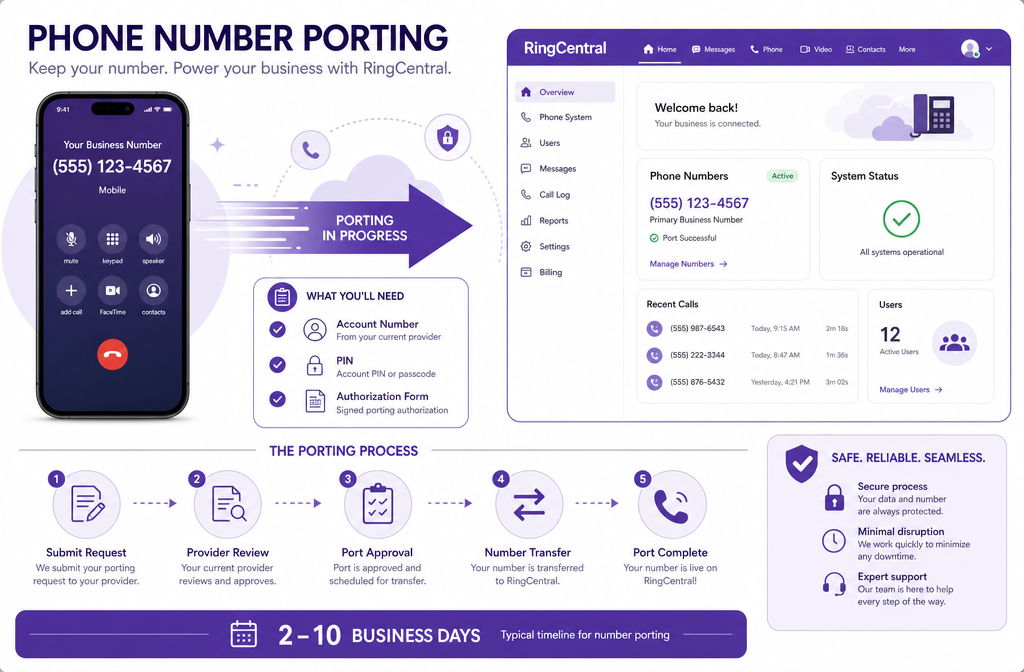
Number porting — also called Local Number Portability (LNP) — is the federally regulated process that allows a phone number to move from one carrier to another without changing the digits. The FCC mandates that carriers must release numbers upon a valid porting request, giving businesses full control over their contact information.
For companies switching to RingCentral, porting means:
- ✅ No need to reprint business cards, update websites, or notify clients of a new number
- ✅ Zero interruption to inbound call flow during the transition
- ✅ Maintaining Google Business Profile, directory listings, and review platforms tied to the number
“Your phone number is a business asset. Protecting it during a carrier switch is just as important as protecting your data.”
Types of Numbers That Can Be Ported
| Number Type | Portable to RingCentral? | Notes |
|---|---|---|
| Local (geographic) numbers | ✅ Yes | Most common port type |
| Toll-free numbers (800, 888, etc.) | ✅ Yes | Requires toll-free LOA |
| Fax numbers | ✅ Yes | Assigned to RingCentral Fax |
| VoIP numbers (from other providers) | ✅ Usually | Depends on originating carrier |
| International numbers | ⚠️ Limited | Check country-specific eligibility |
How to Port Your Number to RingCentral: Step-by-Step
The porting process follows a structured sequence. Rushing any single step is the most common reason for delays or rejections. Follow this roadmap carefully.
Step 1: Verify Eligibility Before Anything Else
Before submitting a porting request, confirm:
- The number is active with the current carrier (do not cancel service yet)
- The RingCentral account is fully set up and active
- The number is not under contract lock with the losing carrier
- The number is within a supported region (RingCentral supports porting in the US, Canada, UK, and select other countries)
⚠️ Critical warning: Canceling service with the old carrier before the port completes will permanently lose the number.
Step 2: Gather Required Documentation
This is where most porting requests fail. Accurate documentation is non-negotiable.
Documents and information needed:
- 📄 Letter of Authorization (LOA) — RingCentral provides a template; must be signed by the account holder
- 📋 Current carrier account number — found on a recent bill
- 🔑 Account PIN or password — set by the current carrier, not the phone’s PIN
- 🏠 Service address on file — must match exactly what the carrier has on record
- 📞 List of numbers to port — all numbers must be on the same LOA if from the same carrier
Pro tip: Pull the most recent bill from the current carrier and use it as a reference document. Every field on the LOA must match the carrier’s records character-for-character.
Step 3: Submit the Porting Request in RingCentral Admin Portal
- Log into the RingCentral Admin Portal at admin.ringcentral.com
- Navigate to Phone System → Phone Numbers → Port Numbers
- Select “Port my numbers” and choose the number type (local or toll-free)
- Enter all account details and upload the completed LOA
- Submit and note the Firm Order Commitment (FOC) date — this is the confirmed porting date provided by the losing carrier
RingCentral’s porting team reviews submissions within 1–2 business days and communicates any corrections needed.
Step 4: Maintain Current Service During the Port Window
The porting window typically runs 5–10 business days for local numbers and up to 15 business days for toll-free numbers. During this period:
- Keep the current carrier account active and paid
- Do not make changes to the account (address updates, plan changes) — this can reset the porting timeline
- Test the RingCentral system using a temporary number assigned at account setup
Step 5: Confirm Completion and Test
On the FOC date, RingCentral activates the ported number. Immediately:
- ✅ Make a test call to the number from an external phone
- ✅ Make a test call from the number to verify outbound caller ID
- ✅ Check voicemail, call routing rules, and auto-attendant settings
- ✅ Confirm fax functionality if applicable
How to Port Your Number to RingCentral Without Delays: Avoiding Common Mistakes
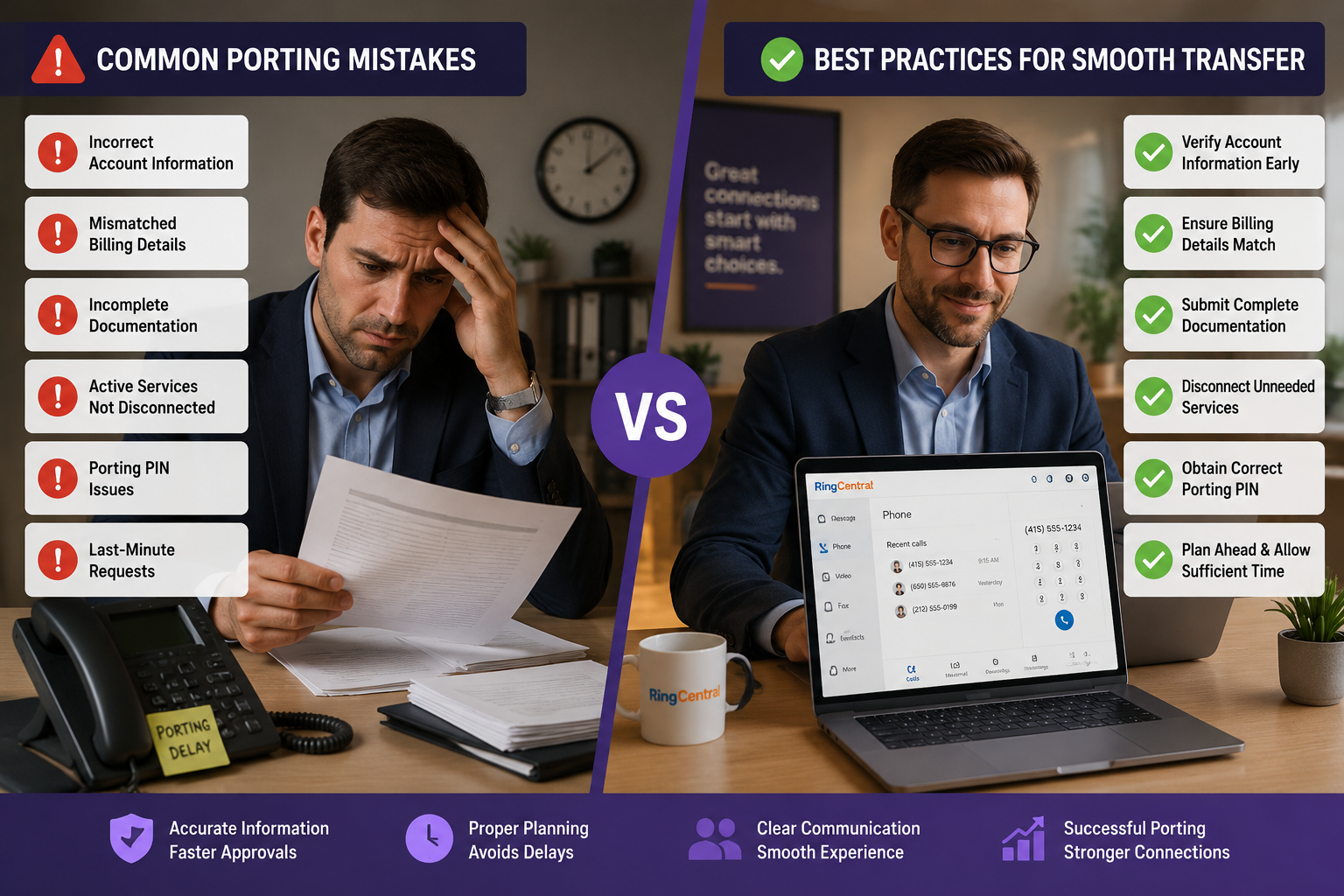
Understanding the porting process is only half the battle. Knowing what derails requests saves days of frustration.
Top Reasons Porting Requests Get Rejected
| Rejection Reason | How to Prevent It |
|---|---|
| Mismatched account name | Use the exact legal name on the carrier account |
| Wrong account PIN | Call the carrier to confirm the current PIN |
| Incorrect service address | Match the address on the most recent bill exactly |
| Number listed as a business line requiring special release | Contact the carrier in advance to flag the number |
| LOA signature mismatch | Only the authorized account holder signs |
Special Scenarios to Know About
Porting a number from another VoIP provider: Some VoIP carriers (like Google Voice or Vonage) have unique release processes. It may be necessary to first port the number to a traditional carrier before porting to RingCentral, though this is becoming less common as of 2026.
Porting multiple numbers: RingCentral allows bulk porting. All numbers on the same carrier account can be included on a single LOA, which streamlines the process significantly.
Emergency porting: In cases of carrier bankruptcy or service failure, RingCentral’s porting team offers expedited processing. Contact RingCentral support directly to initiate an emergency port.
What Happens to Calls During the Port?
During the porting window, calls continue to route through the current carrier as normal. On the FOC date, routing switches to RingCentral automatically — typically within a two-hour window. Brief interruptions of under 15 minutes are possible during the cutover, so scheduling the FOC date during off-peak hours is a smart move.
RingCentral Porting Costs and Timelines at a Glance
RingCentral charges no fee to port numbers in. However, the losing carrier may charge:
- A number release fee (common with some regional carriers)
- An early termination fee if under contract
| Port Type | Typical Timeline |
|---|---|
| Local number (US/Canada) | 5–10 business days |
| Toll-free number | 7–15 business days |
| International number | 2–6 weeks |
| Bulk port (10+ numbers) | 10–20 business days |
Conclusion: Take Control of Your Business Number Today
Learning how to port your number to RingCentral is a straightforward process when approached with the right preparation. The entire journey — from gathering documentation to confirming a successful transfer — can be completed in under two weeks for most businesses.
Actionable next steps:
- Log into RingCentral Admin Portal and navigate to the Phone Numbers section to start a porting request today.
- Pull the most recent carrier bill and verify the account number, PIN, and service address before filling out the LOA.
- Set the FOC date during a low-traffic period to minimize any brief cutover interruption.
- Contact RingCentral support at any stage — their porting team is available to review documentation before submission, which dramatically reduces rejection rates.
The number businesses have built their reputation around deserves to follow them wherever they go. With RingCentral’s porting process, it will.
References
- Federal Communications Commission. (2023). Local Number Portability. https://www.fcc.gov/consumers/guides/local-number-portability-keeping-your-phone-number-when-you-change-providers
- RingCentral. (2024). How to port your phone number to RingCentral. https://support.ringcentral.com/article/porting-numbers.html
- North American Numbering Plan Administrator. (2022). Number Portability Overview. https://www.nanpa.com/number_portability/