
Over 2.3 million UK businesses now operate with remote teams or international staff who need local UK phone numbers, but shipping physical SIM cards internationally costs £15 to £30 per card and takes weeks. The solution? Virtual UK numbers that work entirely over the internet, no physical SIM required.
Getting a UK phone number without a SIM card means using cloud-based communications technology to receive calls and texts on any device with internet access. Whether you’re running a business from abroad, managing UK customer support from another country, or simply need a local presence without the hassle of traditional mobile contracts, virtual numbers deliver the same functionality at a fraction of the cost and setup time.
Key Takeaways
- Virtual UK numbers work through VoIP technology, routing calls over the internet instead of traditional cellular networks, no physical SIM card needed
- Setup takes 5 to 15 minutes with most providers, compared to days or weeks for traditional UK mobile contracts
- Costs range from £3 to £15 per month for basic virtual numbers, with business-grade options starting around £12 to £25 per user monthly
- You can use the same number across multiple devices simultaneously, smartphone, laptop, tablet, or desktop
- Most services offer UK local numbers (020, 0161, 0113) and toll-free options (0800, 0808) with instant activation
Why Get a UK Phone Number Without a SIM Card?
Traditional UK mobile numbers require physical SIM cards, UK addresses for verification, and often 12 to 24-month contracts. Virtual numbers eliminate these barriers entirely.
Business advantages include establishing local UK presence without physical offices, routing calls to remote teams anywhere globally, and scaling phone capacity instantly without ordering new SIM cards or devices. A Manchester-based e-commerce company can hire customer service staff in Portugal while maintaining 0161 Manchester numbers that customers recognize and trust.
Cost efficiency stands out immediately. Traditional UK business mobile contracts cost £20 to £40 monthly per line with setup fees and hardware costs. Virtual numbers typically run £3 to £15 monthly with no contracts, no hardware requirements, and instant cancellation. For a 10-person team, that’s potential savings of £2,000 to £3,000 annually.
Flexibility means using one UK number across your smartphone, laptop, and tablet simultaneously. Take calls on your desktop during office hours, switch to your mobile when traveling, and route after-hours calls to voicemail, all with the same number. No call forwarding fees, no complicated setups.
International accessibility removes geographic restrictions. Freelancers in Asia serving UK clients, expats maintaining UK business connections, or companies testing UK market entry can all get legitimate UK numbers in minutes. The number works anywhere with reliable internet connectivity.
Understanding Virtual UK Phone Numbers and VoIP Technology
A virtual UK phone number operates through Voice over Internet Protocol (VoIP), technology that converts voice into digital data packets transmitted over internet connections rather than traditional telephone networks.
When someone calls your virtual UK number, the call routes through your provider’s servers and reaches you via their app or cloud-based phone system. The caller sees a standard UK number, experiences normal call quality, and pays standard rates, they can’t tell it’s virtual.
Three main types of virtual UK numbers exist:
Local geographic numbers (020 for London, 0161 for Manchester, 0113 for Leeds, etc.) establish regional presence and build local trust. Customers prefer calling local numbers, and businesses report 30% to 40% higher answer rates with local area codes versus generic numbers.
Toll-free numbers (0800, 0808) let customers call free, with businesses paying per-minute charges typically ranging from £0.02 to £0.08. These work well for customer support lines, sales inquiries, and any scenario where removing cost barriers increases engagement.
Mobile-format numbers (07xxx) appear as standard UK mobile numbers. Some providers offer these, though they’re less common for virtual services and may have limitations with SMS verification for certain platforms.
Technical requirements are minimal. You need internet connectivity (broadband, 4G, or 5G), a compatible device (smartphone, tablet, or computer), and the provider’s app or softphone software. Most services work with connections as slow as 100 kbps for voice calls, though 500 kbps or higher ensures better quality.
Call quality depends on your internet connection stability more than speed. A stable 1 Mbps connection outperforms an unstable 10 Mbps connection. Wired connections typically deliver better quality than Wi-Fi, and Wi-Fi beats cellular data for consistency.
Methods to Get a UK Phone Number Without a SIM Card
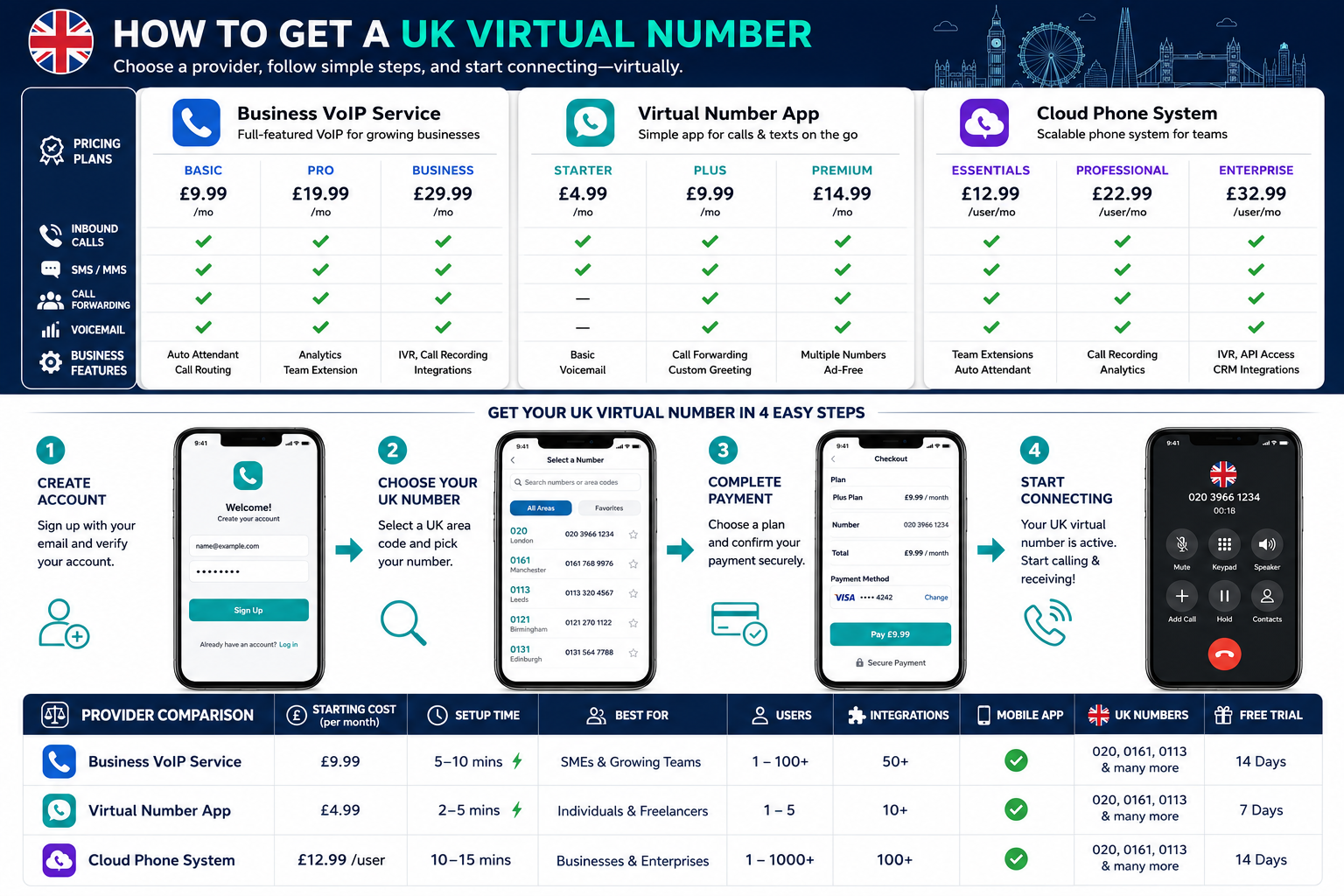
Business VoIP Providers
Professional business phone systems offer the most robust features and reliability. These services target companies needing multiple lines, call routing, analytics, and integration with business tools.
Top providers include:
Vonage provides UK numbers starting at £12 per user monthly with unlimited calling within the UK, mobile apps, desktop software, and basic call management. Setup takes 10 to 15 minutes, and you can port existing UK numbers if needed. Their number porting process typically completes in 5 to 10 business days.
RingCentral offers comprehensive unified communications starting around £15 to £20 per user monthly. You get UK local numbers, video conferencing, team messaging, and advanced call routing. Their platform integrates with CRM systems, making it strong for sales teams needing VoIP features for customer management.
8×8 delivers UK numbers with global calling capabilities from £12 monthly. Their analytics dashboard tracks call volumes, wait times, and team performance, valuable for businesses monitoring customer support metrics.
Setup process follows similar patterns across providers:
- Create an account with business email and payment details
- Select your UK number type (local area code or toll-free)
- Choose your plan tier based on calling volume and features needed
- Download apps for your devices (iOS, Android, Windows, Mac)
- Configure call routing rules and voicemail settings
- Start making and receiving calls immediately
Best for: Established businesses needing 3+ lines, teams requiring collaboration features, companies wanting professional call handling with auto-attendants and call queues, and organizations needing detailed analytics and reporting.
Virtual Number Apps
Consumer-focused apps provide simpler, more affordable options for individuals and small businesses needing basic UK number functionality.
Skype offers UK numbers for approximately £5 monthly with pay-as-you-go calling rates. You get a real UK number that rings through the Skype app on any device. Call quality depends on your internet connection, and the interface is straightforward for non-technical users.
Google Voice doesn’t directly offer UK numbers, but UK residents can get local numbers through the service. International users face restrictions, making this less viable for those outside the UK seeking UK numbers.
Hushed and Burner provide temporary or secondary UK numbers starting around £3 to £8 monthly. These work well for short-term projects, testing UK market interest, or maintaining privacy when sharing contact information.
Setup typically takes 5 minutes:
- Download the app from iOS App Store or Google Play
- Create account with email verification
- Purchase credits or subscription
- Select UK as your country and choose available number
- Start using immediately for calls and texts
Best for: Freelancers needing one UK number, individuals maintaining UK connections while abroad, short-term projects or market testing, and users prioritizing simplicity over advanced features.
Specialized Virtual Number Services
Dedicated virtual number providers focus specifically on providing international numbers with flexible features and competitive pricing.
Sonetel offers UK numbers from £3 monthly with free incoming calls and low outbound rates (typically £0.01 to £0.03 per minute to UK landlines and mobiles). Their app works across devices, and you can add multiple numbers to one account.
Zadarma provides UK numbers starting at £2 monthly with similar pay-per-minute calling. They offer both local and toll-free UK numbers, with detailed call logs and basic routing options.
AVOXI targets businesses needing international presence across multiple countries. UK numbers start around £8 to £12 monthly with professional features like call recording, IVR menus, and real-time analytics.
Setup process:
- Register account on provider website
- Verify identity (some providers require business documentation)
- Select UK number from available inventory
- Add calling credit or set up subscription
- Configure forwarding rules to your existing phone or use their app
- Activate and test the number
Best for: Businesses operating in multiple countries needing consistent international number management, users wanting maximum flexibility in call routing and forwarding, and budget-conscious buyers prioritizing low monthly costs over premium features.
Comparing Costs: Virtual UK Numbers vs Traditional SIM Cards
The financial difference between virtual and traditional UK numbers becomes stark when calculating total costs over 12 months.
Traditional UK SIM card costs:
- Monthly contract: £20 to £40 per line
- Setup/activation fees: £10 to £30
- Physical SIM shipping (international): £15 to £30
- Device requirements: £100 to £800 for compatible phone
- 12-month total: £265 to £540 per line
Virtual UK number costs:
- Monthly subscription: £3 to £15 per number
- Setup fees: £0 (most providers)
- Hardware requirements: £0 (use existing devices)
- Calling costs: £0 to £0.03 per minute (varies by provider)
- 12-month total: £36 to £180 per number
For a 5-person team, traditional SIM cards cost £1,325 to £2,700 annually versus £180 to £900 for virtual numbers, savings of £1,145 to £1,800 yearly.
Hidden costs favor virtual numbers further. Traditional contracts often include:
- Early termination fees (£50 to £200)
- Roaming charges when traveling
- Overage fees for exceeding plan limits
- Replacement SIM costs if lost or damaged
Virtual numbers typically avoid these entirely. Most operate on month-to-month terms with instant cancellation, no roaming charges (calls work anywhere with internet), and unlimited device switching without fees.
Business-grade features cost extra with traditional carriers but come standard with many virtual providers. Call recording, auto-attendants, call analytics, and CRM integration might add £10 to £30 per user monthly with traditional services, while mid-tier virtual plans include them at £12 to £20 total per user.
Setting Up Your Virtual UK Number: Step-by-Step
The setup process varies slightly by provider but follows this general framework that takes 10 to 20 minutes total.
Step 1: Choose Your Provider
Evaluate based on your specific needs:
- Budget: £3 to £8 monthly for basic apps, £12 to £25 for business platforms
- Features: Basic calling versus advanced routing, analytics, and integrations
- Scale: Single number versus team deployment
- Support: Self-service versus dedicated account management
Read provider reviews focusing on call quality, customer support responsiveness, and billing transparency. Check whether they offer UK local numbers in your target area codes.
Step 2: Create Your Account
Most providers require:
- Valid email address
- Payment method (credit card or PayPal)
- Business details (for business-tier plans)
- Identity verification (varies by provider and number type)
Some services offering toll-free numbers or high-volume calling require additional business documentation to prevent fraud.
Step 3: Select Your UK Number
Browse available numbers by:
- Area code: Choose codes matching your target region (020 for London, 0161 for Manchester, etc.)
- Vanity options: Some providers offer memorable number patterns for additional fees
- Number type: Local geographic versus toll-free
Most providers show real-time availability. If your preferred area code is unavailable, check neighboring codes or consider toll-free alternatives.
Step 4: Configure Call Handling
Set up basic routing rules:
- Forwarding destination: Route to your mobile, landline, or app
- Business hours: Define when calls ring through versus going to voicemail
- Voicemail greeting: Record professional greeting or use text-to-speech
- Call screening: Enable caller ID announcement before accepting calls
Advanced users can configure virtual phone system features like multi-level IVR menus, ring groups distributing calls across team members, and time-based routing sending calls to different destinations based on day and time.
Step 5: Install Apps and Test
Download the provider’s apps for all devices you’ll use:
- Smartphone apps (iOS and Android)
- Desktop software (Windows and Mac)
- Web-based interfaces for browser access
Test thoroughly:
- Make outbound calls to verify caller ID displays correctly
- Have someone call your new UK number to test incoming call quality
- Send and receive SMS if your plan includes texting
- Test call quality on different internet connections (Wi-Fi, cellular data, wired)
Step 6: Integrate with Business Tools
If using for business, connect your virtual number to:
- CRM systems for automatic call logging
- Help desk software for support ticket creation
- Team messaging platforms for call notifications
- Analytics tools for performance tracking
Many business VoIP providers offer native integrations with Salesforce, HubSpot, Zendesk, Slack, and Microsoft Teams. Check your provider’s integration marketplace for available connections.
Using Your UK Number Without a SIM: Practical Tips
Optimize call quality by prioritizing connection stability. Use wired ethernet when possible, position yourself near Wi-Fi routers when on wireless, and close bandwidth-heavy applications during important calls. Most VoIP apps include quality indicators showing real-time connection status.
Manage multiple devices effectively by designating primary and secondary devices. Set your smartphone as primary for mobility and your desktop as secondary for office work. Configure simultaneous ring on both devices or use sequential routing (ring mobile first for 15 seconds, then desktop).
Professional presentation matters for business use. Record a professional voicemail greeting mentioning your business name and expected response time. Enable caller ID to display your business name rather than just the number. Consider using local versus toll-free numbers strategically, local numbers for regional customers, toll-free for national support lines.
SMS capabilities vary significantly by provider. Some virtual UK numbers support full two-way SMS, others receive only, and some don’t support texting at all. If SMS verification is critical for your use case, verify this capability before purchasing. For platforms requiring non-VoIP numbers for verification, virtual numbers may face restrictions.
Battery and data management becomes relevant for mobile use. VoIP apps consume more battery than standard phone calls because they maintain constant internet connections. Enable battery optimization settings, close the app when not needed, and consider using Wi-Fi calling to reduce cellular data usage. Typical data consumption runs 0.5 to 1 MB per minute of voice calling.
Security considerations include using strong passwords for your VoIP account, enabling two-factor authentication when available, and avoiding public Wi-Fi for sensitive business calls. Most business-grade providers encrypt calls end-to-end, but consumer apps may not. Check your provider’s security documentation if handling confidential information.
Common Limitations and How to Work Around Them
Emergency calling (999/112) doesn’t work reliably with most virtual UK numbers. VoIP providers can’t always determine your physical location for emergency routing. Keep a traditional mobile phone or landline accessible for emergency calls, or verify your provider specifically supports emergency calling with registered address information.
SMS verification restrictions affect some platforms. Banking apps, social media services, and certain verification systems detect VoIP numbers and reject them for security reasons. If you need a number specifically for SMS verification, research non-VoIP number services designed for this purpose.
Call quality variability depends entirely on internet connection quality. Unlike traditional phone networks with guaranteed quality of service, VoIP calls suffer when internet connections degrade. Symptoms include choppy audio, delays, or dropped calls. Solutions include upgrading internet service, using Quality of Service (QoS) router settings to prioritize VoIP traffic, and switching to wired connections for critical calls.
Number portability works differently than traditional numbers. While you can port numbers between VoIP providers, porting from traditional UK carriers to virtual providers or vice versa faces more restrictions. Some virtual numbers aren’t portable at all. If you might need to port your number later, verify portability terms before purchasing.
Geographic restrictions apply to some services. Certain VoIP providers only offer UK numbers to users with UK billing addresses or IP addresses. Others require UK business registration documents. If you’re outside the UK, verify the provider serves international customers before signing up.
Regulatory compliance matters for business use. UK businesses must comply with Ofcom regulations regarding caller ID accuracy, opt-out mechanisms for marketing calls, and data protection. Ensure your provider supports compliance features like call recording consent, do-not-call list management, and GDPR-compliant data handling.
Frequently Asked Questions
Can I receive SMS messages on a virtual UK number?
SMS capability varies by provider and number type. Many business VoIP services include two-way SMS, while budget virtual number apps may only support voice calls. Check specific provider documentation before purchasing if SMS is essential. Some platforms detect VoIP numbers and block them from receiving verification codes, particularly banking and social media services.
Will my virtual UK number work if I’m traveling internationally?
Yes, virtual UK numbers work anywhere with reliable internet connectivity. The number remains active regardless of your physical location. Callers dial the same UK number and pay UK rates, while you answer from anywhere globally. Data roaming charges may apply if using cellular data abroad, so Wi-Fi connections are preferable when traveling.
How quickly can I get a UK phone number without a SIM card?
Most providers activate virtual UK numbers within 5 to 15 minutes of account creation. You select an available number, complete payment, and start using it immediately. Some providers offering toll-free numbers or requiring business verification may take 24 to 48 hours for approval. This contrasts with traditional UK SIM cards requiring days or weeks for delivery and activation.
Can I port my existing UK mobile number to a virtual service?
Number porting from traditional UK carriers to VoIP providers is possible but involves more complexity than porting between VoIP services. The process typically takes 5 to 15 business days and requires account details from your current carrier. Not all virtual number providers accept ported numbers, and some charge porting fees of £10 to £30. Review our guide on VoIP number porting timelines for detailed information.
Are virtual UK numbers legal for business use?
Yes, virtual UK numbers are completely legal for business use in the UK and internationally. Thousands of UK businesses operate using VoIP-based phone systems. You must comply with standard telecommunications regulations including accurate caller ID display, respecting do-not-call lists, and following GDPR data protection rules. Ensure your provider offers compliance features if operating a business.
What happens if my internet connection drops during a call?
The call will disconnect when internet connectivity is lost. Most VoIP apps attempt to reconnect automatically when connectivity returns, but the active call typically ends. Some business-grade providers offer failover routing that automatically forwards calls to backup numbers (like your mobile) when your primary connection fails. This feature costs extra but provides reliability for critical business lines.
Conclusion
Getting a UK phone number without a SIM card delivers immediate cost savings, operational flexibility, and professional capabilities that traditional mobile contracts can’t match. Virtual numbers cost 60% to 80% less than traditional UK SIM cards while offering superior features like multi-device access, advanced call routing, and instant scalability.
The setup process takes 10 to 20 minutes regardless of your physical location. Choose a provider matching your needs, budget apps starting at £3 monthly for basic use, or comprehensive business phone systems at £12 to £25 monthly for professional features. Configure call handling rules, install apps on your devices, and start making and receiving calls immediately.
Take action now: Evaluate your specific requirements (call volume, SMS needs, team size, integration requirements), compare 2 to 3 providers in your budget range, and sign up for a trial or month-to-month plan. Most providers offer free trials or money-back guarantees, eliminating risk from testing the service.
For businesses considering broader communications upgrades, explore how cloud-based phone systems integrate with your existing tools and workflows. The technology has matured significantly, delivering enterprise-grade reliability at small business prices.
Virtual UK numbers represent the practical future of business communications, location-independent, cost-effective, and infinitely more flexible than traditional phone systems. The question isn’t whether to make the switch, but which provider best fits your specific needs.