
Over 3.2 billion gamers worldwide rely on real-time voice communication to coordinate, compete, and connect — yet most have no idea how the technology powering their callouts actually works. Understanding VoIP in gaming everything you need to know about it can mean the difference between a laggy, frustrating experience and crystal-clear comms that win matches.
This guide breaks down the mechanics, the platforms, the performance factors, and the setup tips that every gamer should have in their arsenal.
Key Takeaways 🎮
- VoIP (Voice over Internet Protocol) converts your voice into digital data packets sent over the internet in real time.
- Latency, jitter, and packet loss are the three biggest enemies of clear in-game voice communication.
- Dedicated VoIP apps like Discord, TeamSpeak, and Mumble offer distinct advantages over in-game voice chat.
- Proper router settings (QoS) and a quality headset dramatically improve VoIP performance.
- Security and privacy are growing concerns in gaming VoIP — knowing the risks keeps you safer online.
What Is VoIP in Gaming? Everything You Need to Know About the Technology
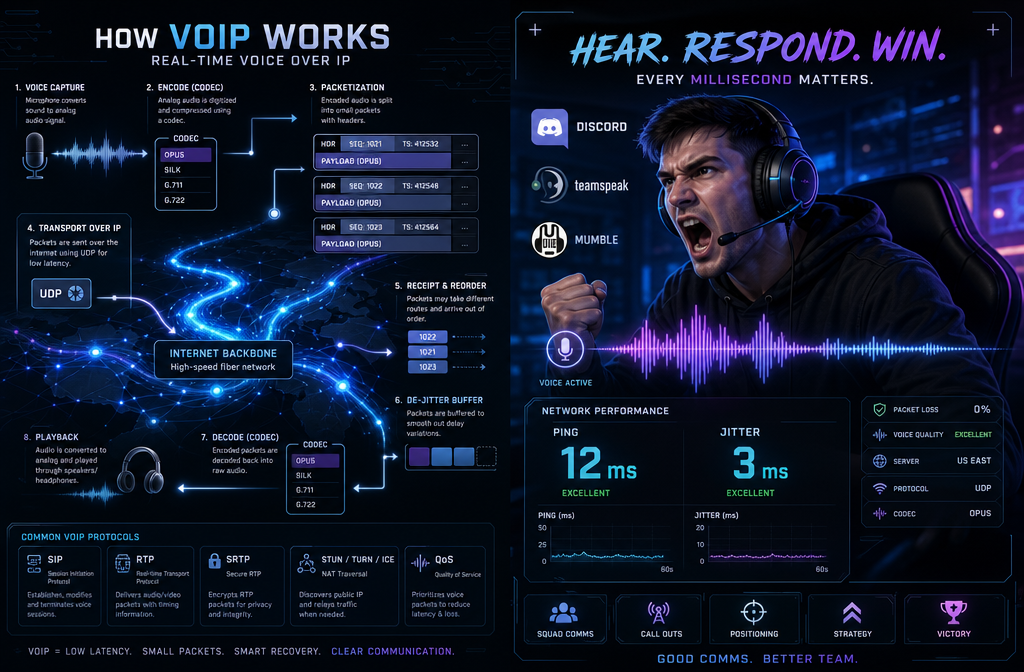
VoIP stands for Voice over Internet Protocol. Instead of using traditional telephone lines, VoIP converts analog voice signals into compressed digital data packets and transmits them over an internet connection. In gaming, this happens in milliseconds — or at least, it should.
How VoIP Works Under the Hood
Here’s the simplified process:
- 🎙️ Capture — Your microphone captures your voice as an analog signal.
- 🔄 Encode — Software compresses the signal using a codec (e.g., Opus, G.711).
- 📦 Packetize — The audio is split into small data packets.
- 🌐 Transmit — Packets travel over the internet to a server or peer.
- 🔊 Decode & Play — The recipient’s device reassembles and plays the audio.
“The codec is the unsung hero of gaming VoIP. Opus, used by Discord, delivers near-FM-quality audio at remarkably low bitrates.”
Key VoIP Metrics That Matter in Gaming
| Metric | Ideal Range | Impact on Gaming |
|---|---|---|
| Latency (Ping) | < 50ms | Delays between speaking and hearing |
| Jitter | < 30ms | Choppy, robotic-sounding audio |
| Packet Loss | < 1% | Dropped words, broken sentences |
| Bitrate | 32–128 kbps | Audio quality vs. bandwidth usage |
Understanding these numbers is the foundation of VoIP in gaming everything you need to know to troubleshoot poor voice quality.
Popular VoIP Platforms for Gamers Compared
Not all voice chat solutions are equal. The platform you choose shapes your audio quality, feature set, and community experience.
Discord 🟣
The dominant force in gaming communication. Discord uses the Opus codec, supports noise suppression, echo cancellation, and integrates with streaming, screen sharing, and game activity tracking. Free tier is robust; Nitro adds higher-quality audio streaming.
TeamSpeak 🔵
A veteran platform favored by competitive and military simulation communities. Highly customizable, self-hostable, and known for extremely low latency. Less beginner-friendly but preferred by serious esports teams.
Mumble 🟢
Open-source and self-hosted. Mumble’s positional audio feature is a standout — it places teammates’ voices in 3D space relative to their in-game position. Ideal for immersive simulation games.
In-Game Voice Chat ⚙️
Built into titles like Call of Duty, Valorant, and Fortnite. Convenient but often lower quality, with limited controls. Useful for quick pub matches; serious players typically switch to dedicated apps.
Quick Comparison Table
| Platform | Latency | Audio Quality | Self-Hosted | Cost |
|---|---|---|---|---|
| Discord | Low | Excellent | No | Free/Paid |
| TeamSpeak | Very Low | Very Good | Yes | Free/Paid |
| Mumble | Very Low | Good | Yes | Free |
| In-Game | Variable | Fair | No | Free |
VoIP in Gaming Everything You Need to Know About Performance Optimization
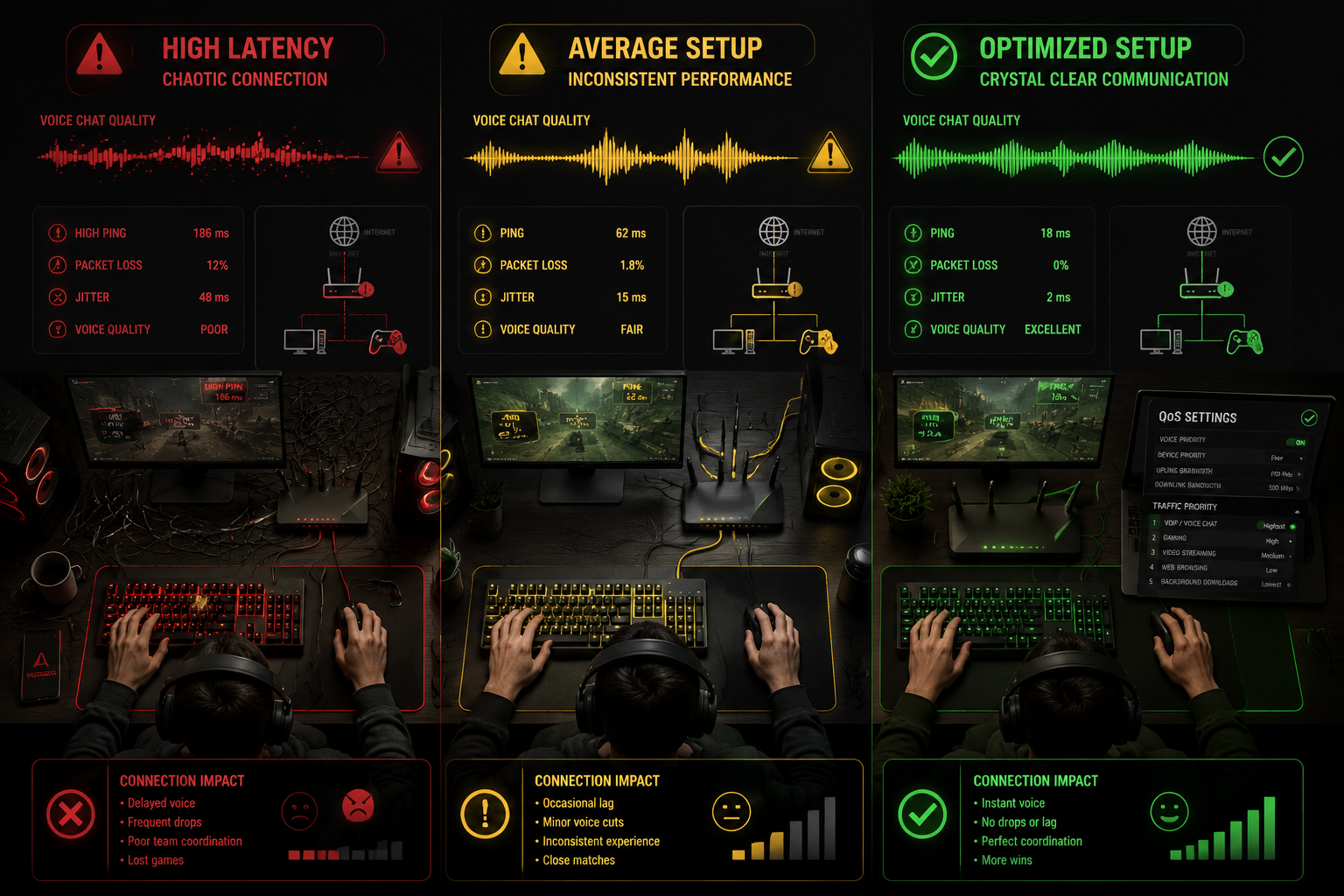
Even the best platform underperforms on a poorly configured network. These are the most impactful optimizations available in 2026.
1. Enable Quality of Service (QoS) on Your Router
QoS prioritizes VoIP data packets over less time-sensitive traffic (downloads, streaming). Most modern routers include QoS settings in their admin panel. Prioritize UDP traffic on the ports your VoIP app uses.
- Discord: UDP ports 50000–65535
- TeamSpeak: UDP port 9987
- Mumble: TCP/UDP port 64738
2. Use a Wired Connection When Possible
Wi-Fi introduces variable latency and interference. A Cat6 Ethernet cable eliminates these variables entirely. If wired isn’t an option, a Wi-Fi 6 router on the 5GHz band is the next best choice.
3. Choose the Right Codec Settings
Most apps auto-select codecs, but power users can manually configure them:
- Opus — Best all-around for gaming VoIP (low latency, high quality)
- G.711 — Higher quality, higher bandwidth; less common in gaming
- Speex — Older, lower quality; largely replaced by Opus
4. Invest in a Decent Headset
Hardware matters. A headset with a cardioid microphone (picks up sound from the front, rejects background noise) reduces the burden on software noise suppression. Recommended specs for 2026:
- Frequency response: 100Hz–10kHz for voice clarity
- Microphone type: Condenser or dynamic cardioid
- Connection: USB or 3.5mm (USB preferred for digital signal processing)
5. Monitor and Reduce Background Applications
Bandwidth-hungry background apps — cloud backups, OS updates, video streams — compete with VoIP packets. Use your OS’s network monitor to identify and throttle or schedule these processes.
Security and Privacy in Gaming VoIP 🔒
Voice communication carries real privacy risks that many gamers overlook.
Common Threats
- Voice phishing (vishing) — Social engineering through voice channels
- IP exposure — Peer-to-peer connections can reveal your IP address
- Eavesdropping — Unencrypted channels on poorly configured servers
- Doxxing via voice metadata — Rare but documented in competitive communities
Best Practices
✅ Use platforms with end-to-end encryption or server-side encryption (Discord encrypts in transit) ✅ Avoid peer-to-peer voice modes when possible — server-mediated connections hide your IP ✅ Never share personal information in public voice lobbies ✅ Use a VPN if IP privacy is a concern, though this may add latency ✅ Regularly audit who has access to your private Discord servers or TeamSpeak channels
VoIP in Gaming Everything You Need to Know: Troubleshooting Common Issues
Even well-configured setups hit problems. Here’s a fast-reference troubleshooting guide:
| Problem | Likely Cause | Fix |
|---|---|---|
| Robotic/choppy voice | High jitter | Enable QoS; switch to wired |
| Echo | Microphone picking up speakers | Use headphones; enable echo cancellation |
| One-sided audio | Wrong output device selected | Check audio settings in app and OS |
| High latency | Distant server region | Switch to a closer server region |
| Cutting out | Packet loss | Check ISP connection; restart router |
| Background noise | Poor mic or no noise suppression | Enable noise suppression; upgrade mic |
The Future of VoIP in Gaming 🚀
Several emerging technologies are reshaping gaming voice communication:
- AI-powered noise suppression — Tools like NVIDIA RTX Voice use machine learning to isolate voice from background noise in real time.
- Spatial/3D audio VoIP — Expanding beyond Mumble into mainstream platforms, placing teammate voices directionally in 3D space.
- Low-Earth Orbit (LEO) satellite internet — Services like Starlink are bringing sub-50ms latency to rural gamers, making VoIP viable where it previously wasn’t.
- Cross-platform voice integration — Unified voice channels across PC, console, and mobile are becoming standard in 2026’s gaming ecosystem.
Conclusion: Level Up Your Communication
VoIP in gaming everything you need to know ultimately comes down to three pillars: understanding the technology, choosing the right platform, and optimizing your setup. Voice communication is not a luxury — in team-based games, it is a competitive tool.
Actionable next steps:
- ✅ Test your current latency and jitter using a free tool like PingPlotter or your router’s diagnostics.
- ✅ Switch to Discord or TeamSpeak if you’re relying solely on in-game voice chat.
- ✅ Enable QoS on your router and prioritize UDP traffic for your VoIP app.
- ✅ Audit your privacy settings — review who can join your voice channels.
- ✅ Consider a headset upgrade if your current mic introduces echo or background noise.
Clear comms win games. Start optimizing today.
References
- Cisco Systems. (2020). Voice over IP — Per Call Bandwidth Consumption. Cisco Documentation.
- Discord. (2023). How Discord’s Audio Processing Works. Discord Engineering Blog.
- Mozilla Foundation. (2022). Opus Codec Technical Overview. Mozilla Developer Network.
- Jiang, W., & Schulzrinne, H. (2000). Modeling of packet loss and delay and their effect on real-time multimedia service quality. Proceedings of NOSSDAV 2000.
- NVIDIA. (2021). RTX Voice: AI-Powered Noise Removal. NVIDIA Developer Blog.