
WhatsApp blocks over 40% of VoIP-based phone numbers during its SMS verification process — leaving countless users locked out before they even send their first message. If a verification attempt has failed repeatedly, the culprit is almost certainly a VoIP number. Knowing how to get a non-VoIP number for WhatsApp is the single most important step toward a successful, verified account.
Key Takeaways 📌
- WhatsApp actively detects and rejects VoIP numbers during phone verification.
- A real SIM-based number (prepaid or postpaid) is the most reliable solution.
- Virtual number providers offering real mobile numbers can work as an alternative.
- Second-hand or secondary SIM cards are a cost-effective option for extra accounts.
- Always verify that a number is classified as “mobile” — not “VoIP” — before attempting registration.
Why WhatsApp Rejects VoIP Numbers
Before diving into solutions, it helps to understand the problem clearly.
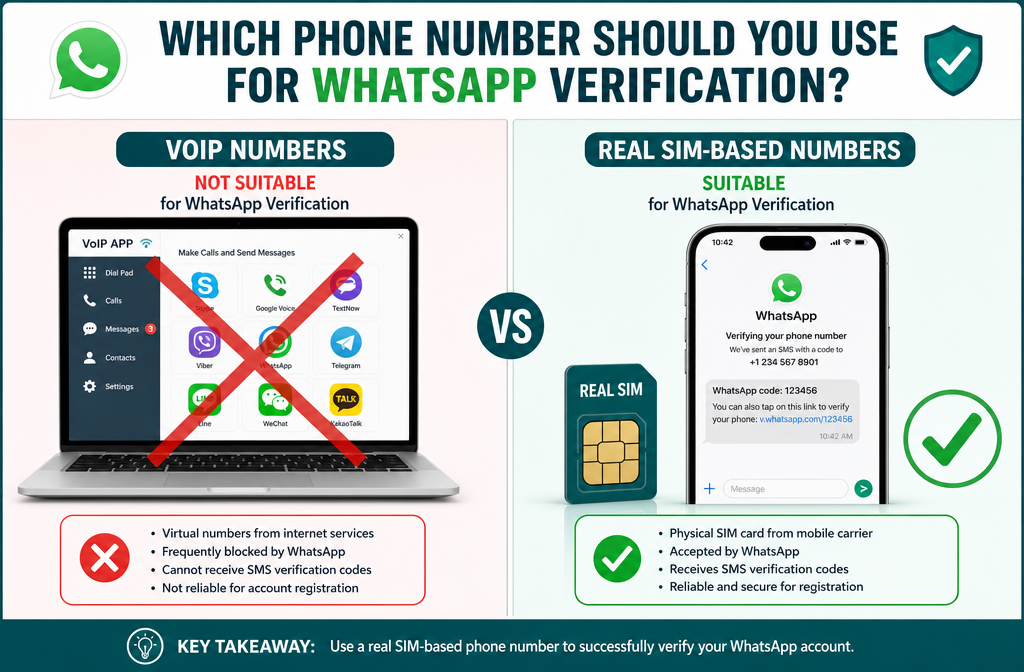
VoIP (Voice over Internet Protocol) numbers are digital phone numbers that route calls and texts through the internet rather than a traditional cellular network. Examples include:
- Google Voice
- Skype numbers
- TextNow
- MagicJack
- Most “free phone number” apps
WhatsApp uses a carrier-level lookup system to classify incoming numbers. When a number is flagged as VoIP, landline, or “non-mobile,” the platform either refuses to send the SMS code or silently blocks verification.
💡 Pull Quote: “WhatsApp’s verification system doesn’t just check the number — it checks the type of number. VoIP numbers fail that check almost every time.”
This is a deliberate anti-spam and anti-fraud measure. Because VoIP numbers are cheap and easy to generate in bulk, bad actors use them to create fake accounts. WhatsApp’s defense? Require a genuine mobile number tied to a real cellular carrier.
What Counts as a “Non-VoIP” Number?
A non-VoIP number is any phone number assigned through a licensed mobile carrier and delivered via a physical or eSIM. These numbers are registered on cellular networks (GSM, CDMA, LTE, 5G) and are verifiable at the carrier level.
| Number Type | WhatsApp Compatible? | Example |
|---|---|---|
| Prepaid SIM (mobile) | ✅ Yes | T-Mobile prepaid, Lycamobile |
| Postpaid SIM (mobile) | ✅ Yes | AT&T, Verizon, Vodafone |
| eSIM (mobile) | ✅ Usually yes | Airalo, Google Fi |
| Google Voice | ❌ No | VoIP |
| Skype Number | ❌ No | VoIP |
| TextNow / TextFree | ❌ No | VoIP |
| Landline | ❌ No | Fixed-line |
The key distinction: the number must be routable through a real cellular network, not an internet-based switching system.
How to Get a Non-VoIP Number for WhatsApp: 4 Proven Methods
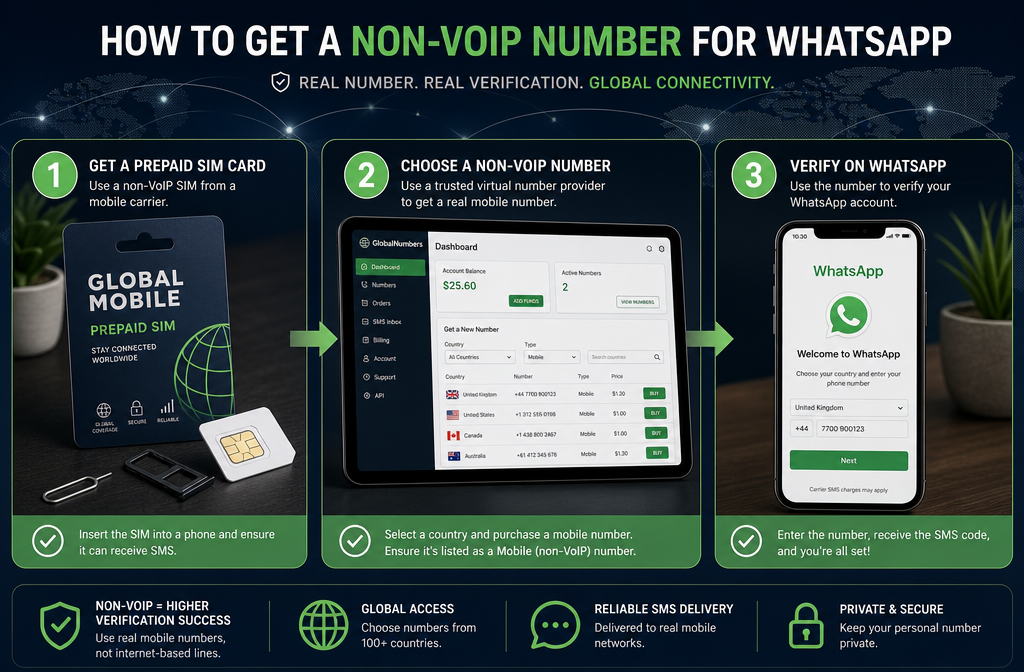
There is no single “best” method — the right choice depends on budget, location, and intended use. Here are the four most reliable approaches available in 2026.
Method 1: Buy a Prepaid SIM Card (Most Reliable) 📱
This is the gold standard. A prepaid SIM card from any licensed mobile carrier gives a genuine mobile number that WhatsApp will accept without hesitation.
Steps:
- Visit a carrier store, supermarket, or electronics retailer.
- Purchase a prepaid SIM (often $5–$15 USD, sometimes free).
- Insert the SIM into any unlocked phone.
- Power on the device and wait for network registration.
- Open WhatsApp and enter the new number for verification.
- Receive the SMS code and complete setup.
Best prepaid options in 2026 (US market):
- Mint Mobile – affordable, runs on T-Mobile network
- Tracfone – widely available, no contract
- Lycamobile – great for international users
- Metro by T-Mobile – budget-friendly with strong coverage
⚠️ Important: Even with a prepaid SIM, make sure the plan includes SMS capability. Data-only SIMs will not receive the verification text.
Method 2: Use an eSIM from a Reputable Provider 🌐
eSIMs are digital SIM cards built into modern smartphones. Several carriers now offer eSIM plans that provide real mobile numbers — not VoIP — making them fully compatible with WhatsApp.
Recommended eSIM providers:
- Airalo – international eSIM marketplace, real mobile numbers
- Google Fi – works on real cellular networks (T-Mobile, US Cellular)
- Truphone – business-grade eSIM with genuine mobile numbers
Advantages of eSIMs:
- No physical card needed
- Instant activation (minutes, not days)
- Works in multiple countries
- Easy to manage from a smartphone
Method 3: Get a Secondary Physical Phone Line 📞
For users who need a dedicated WhatsApp number separate from their personal line, adding a second line to an existing carrier plan is a clean solution.
Most major carriers offer secondary lines for $10–$25/month. This number is 100% mobile-classified and will pass WhatsApp’s verification every time.
This option works well for:
- Business WhatsApp accounts
- Keeping personal and professional contacts separate
- Users who need a permanent, stable number
Method 4: Use a Virtual Number Service That Provides Real Mobile Numbers 💻
Some virtual number providers — unlike VoIP services — actually lease real mobile numbers from licensed carriers. These are distinct from VoIP numbers because they sit on actual cellular infrastructure.
Providers to evaluate in 2026:
- Hushed (select plans with real mobile numbers)
- Burner (mobile-classified numbers on some tiers)
- MySudo (privacy-focused, real mobile numbers)
⚠️ Caution: Not all virtual number services work with WhatsApp. Always verify that the number is classified as “mobile” using a free number lookup tool (such as Twilio Lookup or NumVerify) before purchasing.
How to Verify a Number Before Using It for WhatsApp
Spending money on a number only to have it rejected is frustrating. Use these free tools to check a number’s classification before attempting WhatsApp verification:
- Twilio Lookup API – enter the number and check the “line type” field; it should read “mobile.”
- NumVerify – free online tool, shows carrier and line type.
- WhatIsMyNumber.net – quick lookup for number classification.
If the lookup returns “VoIP,” “landline,” or “fixed-line,” that number will almost certainly fail WhatsApp verification.
Common Mistakes to Avoid ❌
- Using recycled numbers: Some prepaid SIMs come with previously used numbers that may be banned on WhatsApp. If verification fails on a brand-new SIM, try a different carrier.
- Relying on free number apps: Apps like TextNow, 2ndLine, and TextFree are VoIP-based and will not work.
- Skipping the number lookup step: Always verify the line type before purchasing a virtual number plan.
- Using data-only SIMs: These do not support SMS, which WhatsApp requires for its verification code.
Frequently Asked Questions
Can Google Voice numbers be used for WhatsApp? No. Google Voice is a VoIP service. WhatsApp’s system identifies and blocks it during verification.
Does WhatsApp work with eSIMs? Yes, as long as the eSIM is from a real mobile carrier (not a VoIP provider) and the plan includes SMS.
What if the prepaid SIM number is already banned on WhatsApp? Contact the carrier for a replacement SIM with a different number, or try a different carrier entirely.
Is it against WhatsApp’s terms to use a second number? No. WhatsApp allows one account per phone number, but there is no restriction on having multiple accounts on different devices with different numbers.
Conclusion: Take Action and Get Verified ✅
Understanding how to get a non-VoIP number for WhatsApp removes one of the most common and frustrating barriers to account setup. The solution is straightforward: use a number that lives on a real cellular network.
Actionable next steps:
- ✅ Check the current number using Twilio Lookup or NumVerify to confirm it is classified as “mobile.”
- ✅ Purchase a prepaid SIM from a local carrier if the current number is VoIP or landline.
- ✅ Consider an eSIM for instant activation without visiting a store.
- ✅ Verify the number type before buying any virtual number service.
- ✅ Complete WhatsApp verification and enjoy a fully functional account.
The process takes less than 30 minutes from start to finish. A small investment in the right type of number saves hours of troubleshooting and repeated failed verification attempts.
References
- WhatsApp Help Center. (2023). About registration and verification. Meta Platforms. https://faq.whatsapp.com
- Twilio. (2022). Lookup API documentation: Line type intelligence. Twilio Inc. https://www.twilio.com/docs/lookup
- GSMA. (2023). The mobile economy 2023. GSM Association. https://www.gsma.com/mobileeconomy
- Statista. (2024). Number of WhatsApp users worldwide. Statista Research Department. https://www.statista.com